


Quick answer: best Shopify automation tools in 2026
Start with Shopify Flow for predictable store workflows. Add a specialist tool only where Flow stops being enough, Zapier for external apps, Mechanic for complex custom logic, Matrixify for bulk data, Gorgias for support, Klaviyo for lifecycle marketing, and PagePilot MCP for agentic product-launch workflows.
What is Shopify automation?
Shopify automation means using rules, workflows, integrations, or AI agents to complete store tasks without handling every step manually.
That can include routine operations such as tagging customers, updating inventory, creating collections, sending low-stock alerts, and syncing orders. It can also cover more complex work such as publishing products, running campaigns, resolving support requests, changing prices, building pages, and launching new products.
Some of that is deterministic. It follows a rule someone wrote in advance.
If order value exceeds $500, tag it High Value.
Some are agentic. It requires interpretation, there's no fixed rule to follow. Just a goal.
Review my recent product performance and identify which offer I should test next.
1. Shopify Flow: best free/native Shopify automation tool
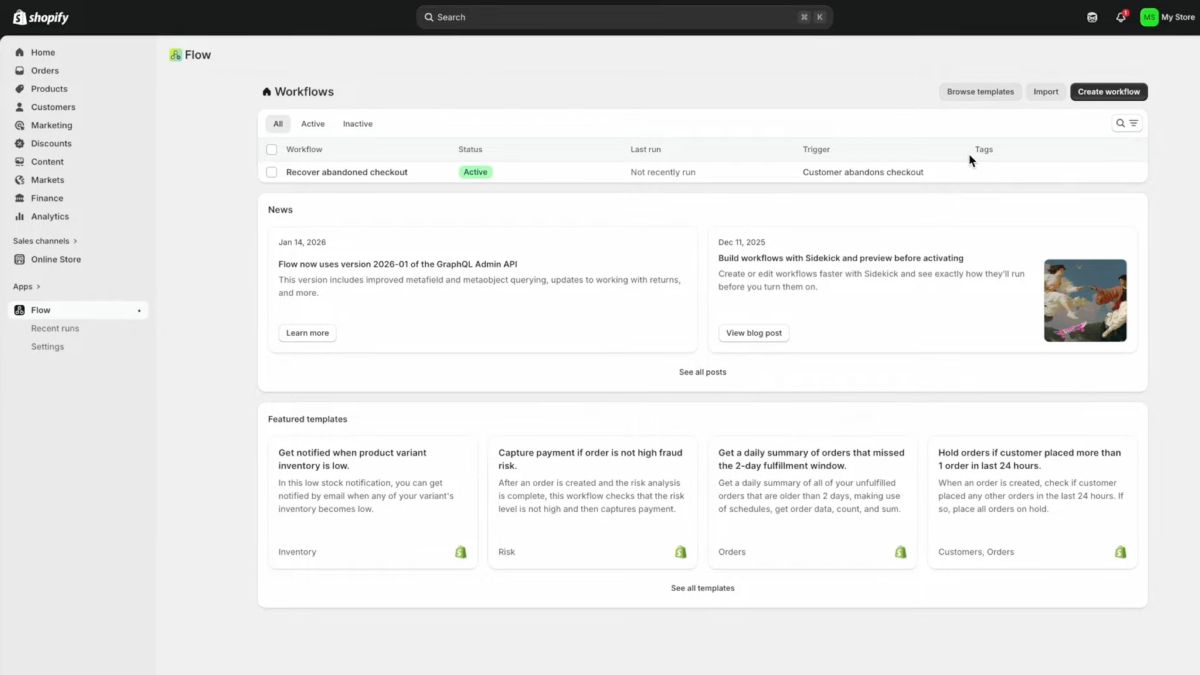
Best for: Most Shopify stores that need predictable, repeatable workflow automation.
Shopify Flow is a free app on Basic, Grow, Advanced, and Plus. Every workflow starts with one trigger, then branches through conditions and actions. But Flow goes well beyond basic “if X, do Y” rules.
It supports scheduled workflows as often as every 10 minutes, data lookups returning up to 100 objects, loops, aggregation, multiple conditions and actions, and connectors for apps such as Slack, Google Sheets, Asana, and Trello. HTTP requests are available on Grow, Advanced, and Plus, while custom partner-app tasks are Plus-only.
What Flow can automate
- Inventory. Notify the team when stock falls below a threshold.
- Orders. Tag high-value orders or route them by predefined rules.
- Customers. Apply tags when purchase criteria are met.
- Products. Tag or change products based on inventory or catalog events.
- Fraud. Route risky orders for review.
- Marketing. Trigger supported actions in connected apps.
- Fulfillment. Route, hold, or tag fulfillment work according to store rules.
Flow also has a useful safety layer before any of that runs live. Merchants can test workflow logic using real or simulated store data without the test changing orders, products, or other live store data. Sidekick can even generate simulated passing and failing events for testing.
One limitation is easy to miss: automatic does not mean instantaneous. Shopify says Flow starts workflows as soon as possible but does not guarantee a specific completion time. That makes it well suited to operational automation, but not something to treat as a hard real-time system.
Flow's real boundary is interpretation. It can handle sophisticated rules, schedules, loops, and app actions, but the logic still has to be defined before the workflow executes.
Is Shopify Flow enough?
Shopify Flow is enough when you can define in advance what should trigger the workflow, what conditions matter, and what should happen next.
When inventory falls below five, send the team a Slack alert.
That's Flow territory.
A task such as “review sales, margins, inventory, and recent performance and decide which product I should push next” is different. The correct action has to be worked out from context rather than encoded beforehand.
A useful dividing line is simple. If the decision can be written as rules before execution, Flow is a strong fit. If the system has to interpret the situation first, you are moving into agentic or custom automation.
2. Shopify Sidekick: best AI automation built into Shopify
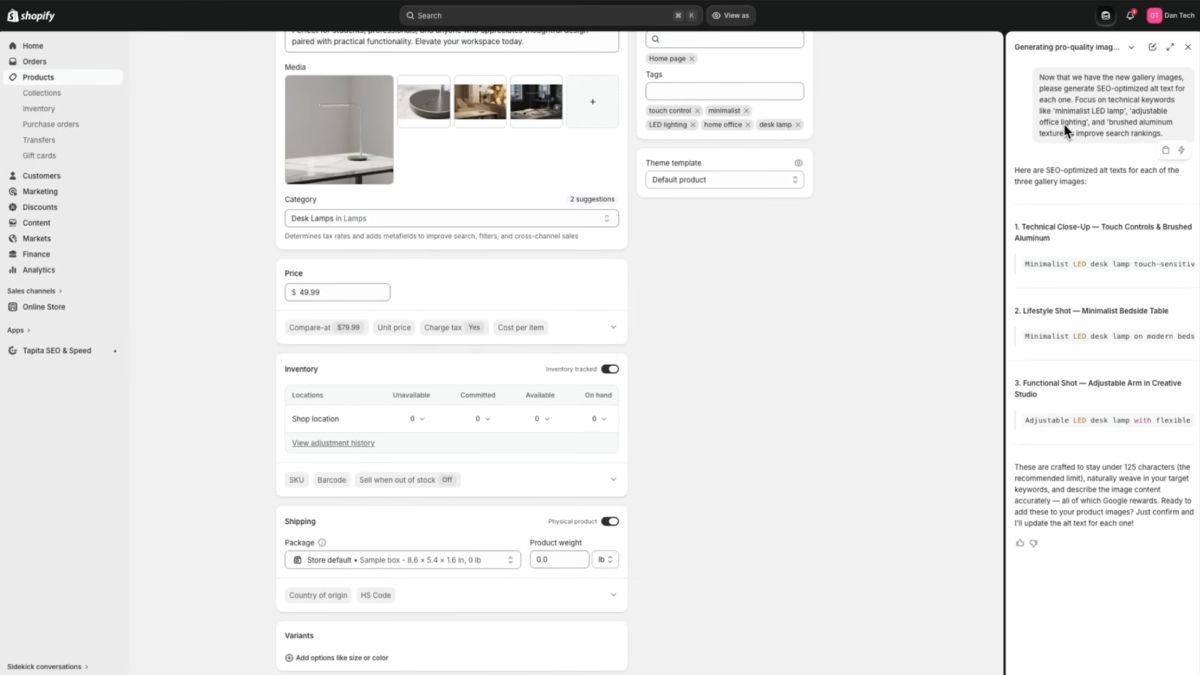
Best for: Merchants who want to run Shopify tasks in plain language when the right action depends on current store context rather than a fixed rule.
Sidekick works inside Shopify Admin and can use the page, store data, recent activity, and conversation context to analyze performance and complete supported tasks. It can work with products, orders, discounts, collections, reports, content, themes, and supported third-party apps. Any store change still has to be reviewed and approved before Sidekick applies it.
That makes Sidekick a different kind of automation from Flow. A merchant can ask:
Analyze my sales and inventory and identify which bestselling products are most likely to run out.
Sidekick can interpret the request against current store data. Flow cannot decide what “most likely to run out” means on its own unless that logic has already been defined in the workflow.
Sidekick also makes recurring AI work easier without turning it into scheduled automation. Merchants can save up to 25 prompts as Skills and rerun them with a shortcut, useful for repeated sales snapshots, inventory analysis, forecasts, or content tasks. The Skill still runs when the merchant invokes it; it is not the same thing as a Flow trigger firing automatically.
Shopify Flow vs Sidekick
The cleanest distinction is when the decision gets made.
With Shopify Flow, the logic is decided before the workflow runs. A trigger occurs, Flow checks the conditions, and the configured actions execute.
With Sidekick, the merchant gives it a goal and Sidekick interprets the current context before deciding what supported action to propose. Shopify also notes that the same AI request can produce different results, which is another reason Sidekick changes remain review-controlled.
The two can also work together. Sidekick can generate or edit a Flow workflow from a plain-language instruction, including its trigger, conditions, and actions. Generated workflows are inactive by default, currently require desktop, and should be tested carefully because Shopify warns that complex workflows can omit business-specific logic.
Once the merchant turns the workflow on, Flow (not Sidekick) runs it unattended.
Sidekick can reach beyond native Shopify functions through supported installed apps as well. It asks for permission before using an app, activates that app only for the current conversation, and can select the most relevant supported app when several could handle the request.
Biggest advantage
Sidekick already has Shopify context, so the merchant can move from “what is happening?” to a supported action without first encoding the problem as a workflow.
Biggest limitation
It’s not a replacement for unattended deterministic automation. Store changes require approval, and specialist systems still go deeper in areas such as continuous repricing, support resolution, lifecycle marketing, or product-launch automation.
3. PagePilot MCP + AI agent: best for product-launch automation
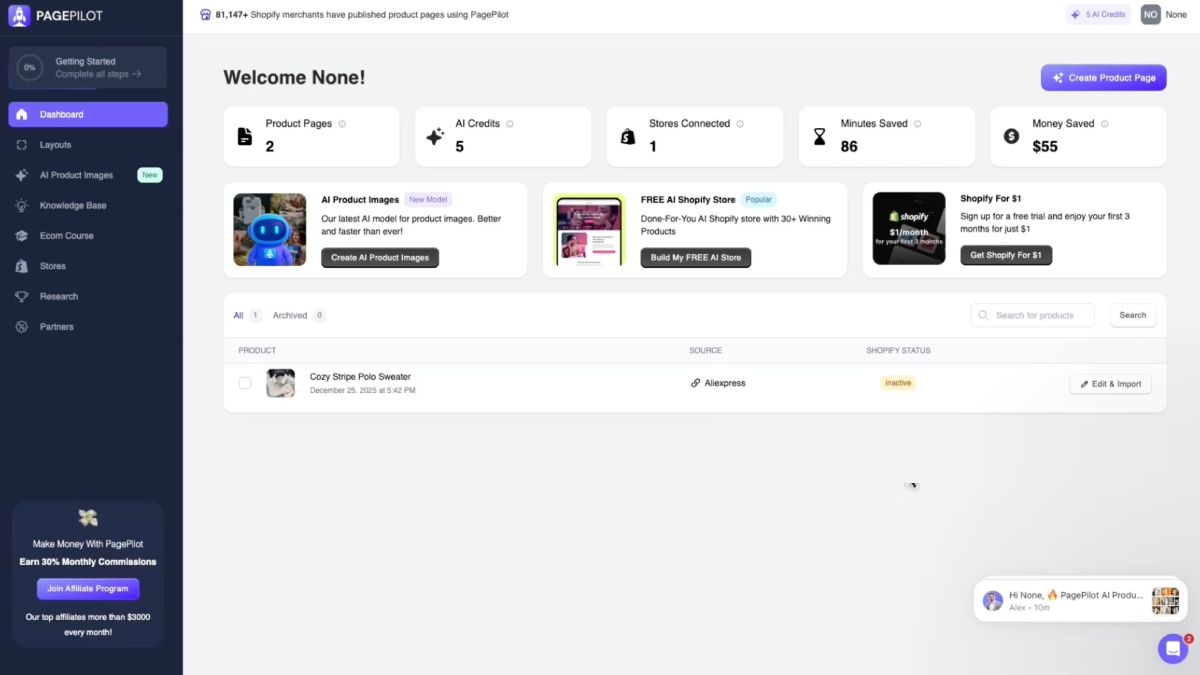
Best for: Shopify merchants, product testers, performance marketers, dropshippers, and agencies that repeatedly move products from research into launch.
PagePilot MCP is different from Shopify Flow because the workflow can begin before there’s anything in Shopify to automate. An agent can start with a request such as:
Find me a product worth testing.
From there, PagePilot can expose the research, page-building, offer, catalog, creative, and publishing actions needed to keep the launch moving in the same conversation.
Its research tools can surface winning products, high-revenue Shopify stores and their bestsellers, Facebook ad activity, Scaling-status products, and margin comparisons. PagePilot's public documentation also confirms that its wider platform can turn an AliExpress, Shopify, or Amazon product URL into a new product page using a chosen audience, language, product angle, and layout.
Once the page exists, the MCP can work on the launch itself: rewrite copy, translate reviews, edit guarantee text, set prices and compare-at prices, configure variants and SKUs, and generate replacement AI lifestyle imagery. PagePilot's current editor also supports bulk and per-variant pricing, compare-at pricing, and SKU changes before Shopify import.
The useful part is that those actions can be chained:
Using the PagePilot MCP, find a product currently scaling on Facebook, pick the highest-margin option, build a French product page, set the price to 39.99, generate lifestyle imagery, and publish it to my store.
That is PagePilot's real automation advantage. The merchant is not asking an AI to write some copy and then manually carrying the result through five different tools. The agent can keep moving through the launch because PagePilot exposes the actions needed at each stage.
Publishing still has boundaries. The Shopify store has to be connected to PagePilot first; MCP does not connect stores itself. The connected workflow can preview and publish the page, including publishing it as a new Shopify product. PagePilot's public documentation likewise confirms that generated pages can be imported into connected Shopify stores.
There are also safeguards around write actions. Depending on the AI client's permissions, the agent can ask before making changes. PagePilot reads the existing page before editing it, asks before consuming AI-image credits, and backs up an existing Shopify product before an overwrite.
Shopify Flow vs PagePilot MCP
Flow and PagePilot automate different stages of ecommerce work.
- Shopify Flow starts with a known event or schedule. A product gets published, inventory falls below a threshold, an order reaches a certain value, and Flow executes the rules that were configured beforehand.
- PagePilot MCP starts with a product-launch goal. The agent can research an opportunity, choose between candidates, build the page, configure the offer and variants, generate creative, and publish the finished product.
That also means PagePilot MCP is not a replacement for Flow. It does not handle recurring inventory automation, fulfillment routing, order tagging, or other backend rules. Its MCP interface is also narrower than the full PagePilot dashboard. Deeper layout changes, SEO settings, store connections, and some page-management tasks still happen outside the MCP workflow.
The two tools therefore fit naturally in sequence. PagePilot gets the product researched, built, and published. Flow automates what should happen repeatedly once that product is live.
Biggest advantage
PagePilot MCP can automate a multi-step product-launch workflow that starts before the product exists in Shopify and ends with a published page.
Biggest limitation
Its automation depth is concentrated on product research and launch. It is not a general Shopify operations layer for inventory, orders, fulfillment, support, or recurring backend workflows.
Find, Build and Publish Your Next Product With PagePilot MCPConnect ChatGPT or Claude to PagePilot MCP and move from product research to a live Shopify page in one conversation.
4. Zapier: best for automating Shopify across other apps
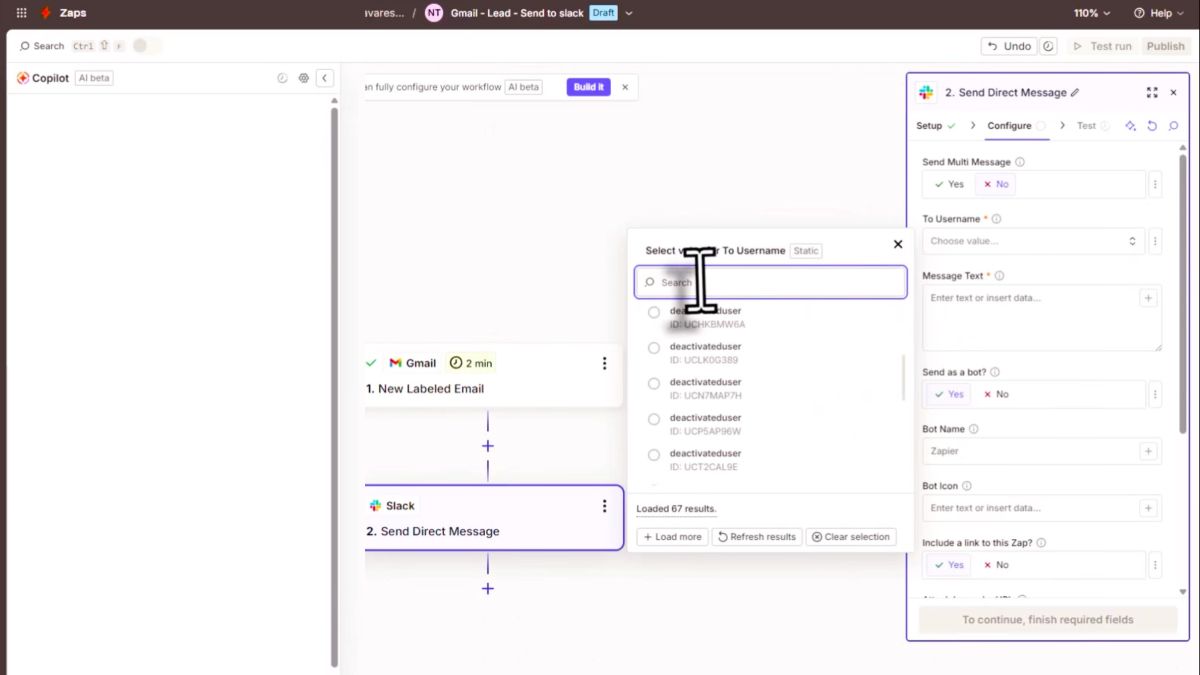
Best for: Stores whose workflows regularly move between Shopify and accounting, CRM, spreadsheets, project management, marketing, or other external systems.
Zapier connects Shopify triggers and actions with more than 9,000 apps. A Shopify event such as a new paid order, customer, cancellation, or product update can start a workflow, while Zapier can also write back to Shopify through supported actions such as creating customers or updating products. Many common Shopify triggers are webhook-based and run instantly; others use polling instead.
A concrete example is accounting:
When a Shopify order is paid, create the corresponding sales invoice in Xero.
That is a current Zapier template, not just a hypothetical use case. The Shopify trigger includes line-item support, and the Xero action creates the sales invoice automatically.
The main catch is pricing. Shopify is a Premium Zapier app, so using it in Zaps requires a paid Zapier plan (Professional or higher). The Shopify store itself can be on Basic, Grow, Advanced, or Plus.
Zapier is also starting to blur the line between traditional workflow automation and agentic tooling. Through Zapier MCP, an MCP-compatible AI can call approved Shopify actions and actions from Zapier’s wider app ecosystem. That does not replace Zaps, but it means Zapier can now serve both fixed cross-app workflows and AI-driven tool access.
Biggest advantage
Zapier’s strength is not simply connecting Shopify to “outside apps.” It is chaining Shopify with a much broader app ecosystem when one workflow needs to cross several systems.
Biggest limitation
If the workflow already fits inside Shopify or a supported Flow connector, Zapier adds another platform, another subscription, and another place to troubleshoot.
5. Mechanic: best for complex custom Shopify automation
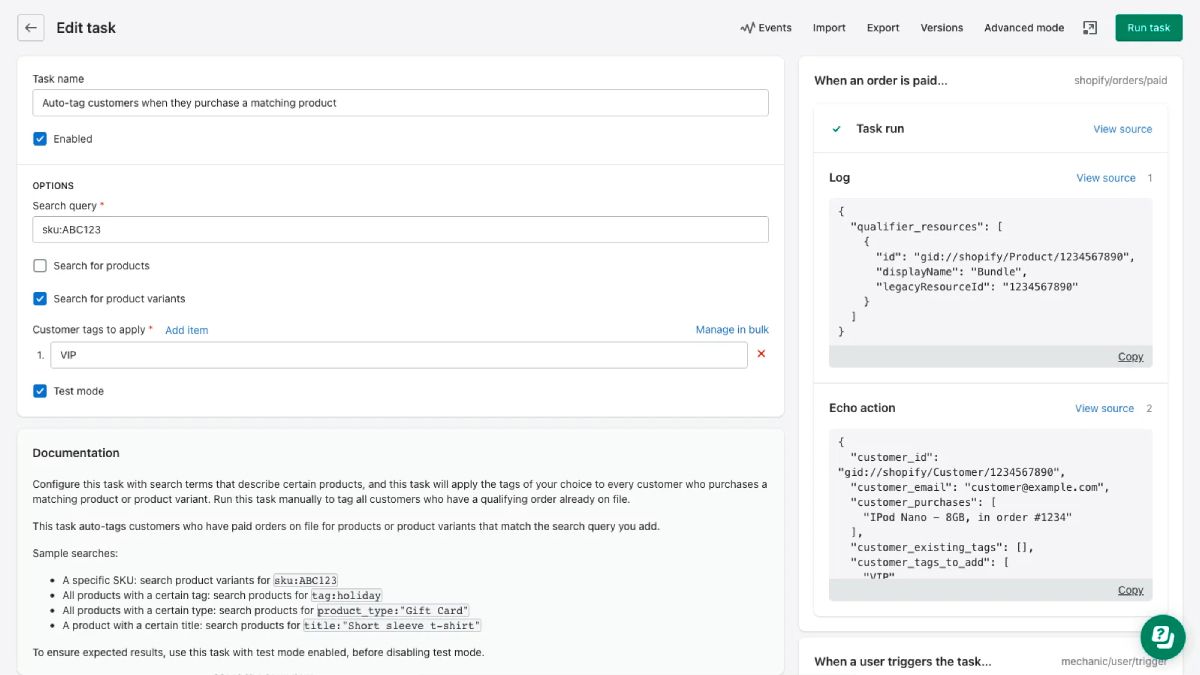
Best for: Merchants, agencies, and developers that need Shopify automation beyond what a visual workflow builder can express cleanly.
Mechanic combines a library of 355+ ready-made automations with a programmable task system built around Liquid, Shopify events, schedules, and the Admin API. Existing tasks cover jobs such as tagging, inventory, order processing, fraud checks, replenishment, notifications, product operations, and scheduled workflows.
The difference from Flow is what happens when the predefined building blocks stop being enough. A Mechanic task can contain custom Liquid logic, read Shopify data, write through the Admin API, make HTTP requests, generate files or emails, and connect with services such as Google Sheets, Slack, Airtable, and FTP.
Tasks can start from a Shopify webhook, Mechanic’s scheduler, a delayed event, or a manual action. Mechanic also supports on-demand runs from Shopify Admin, so a merchant can select an order, customer, or other supported resource and send it to a compatible task instead of waiting for an automated trigger.
Every night, find products that match these pricing rules, update them, generate a report, and send it to merchandising.
That is where Mechanic earns its place: the workflow can contain business-specific logic instead of being limited to the conditions and actions exposed by a visual builder.
Biggest advantage
Mechanic gives developers direct control over the automation logic while still providing ready-made tasks for common Shopify jobs.
Biggest limitation
The more custom the workflow becomes, the more technical the setup becomes. Ready-made tasks can be straightforward, but custom work benefits from Liquid, API, and Shopify data-model knowledge.
Shopify Flow vs Mechanic
Flow is the easier starting point for common Shopify automation. Mechanic fits when the logic becomes too bespoke for Flow’s existing triggers, conditions, actions, and connectors.
They are not strictly either/or, though. Mechanic has an official two-way Shopify Flow integration: Mechanic can send data into Flow as a trigger, and Flow can send events into Mechanic to start a task. That means Flow can remain the visible workflow layer while Mechanic handles the custom logic behind one step.
Use Flow when the workflow can be assembled from supported building blocks. Use Mechanic when you need to write the behavior itself.
6. Matrixify: best for bulk Shopify data automation
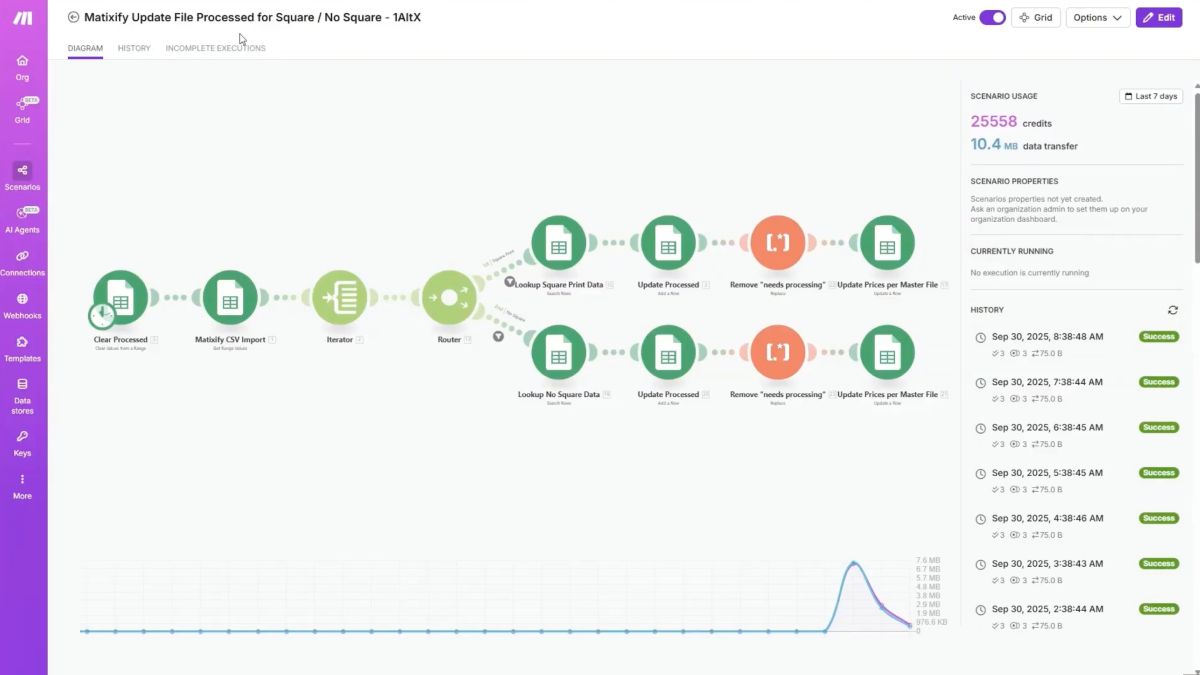
Best for: Stores with large catalogs, recurring spreadsheet-driven updates, migrations, or other jobs where thousands of Shopify records need to change in a predictable way.
Matrixify automates Shopify data through imports and exports rather than conversational instructions. It can work across products, variants, collections, customers, orders, discounts, pages, blog posts, metafields, translations, and other supported Shopify data.
The important distinction is that this is batch automation, not live synchronization. A merchant can schedule a file to be imported every morning, export store data on a recurring schedule, or run the job manually when needed. Matrixify can pull those files from sources including Google Sheets, Google Drive, Dropbox, FTP/SFTP, SharePoint, or a direct URL.
Import the latest prices and inventory from this Google Sheet every morning.
Matrixify downloads a fresh version of the source file on each scheduled run and processes the changes on its own servers, so the merchant does not need to leave the app open. Scheduled jobs can be monitored from All Jobs, where the store can see progress, cancel a run, and download the resulting import file for troubleshooting.
Its current limits make the scale difference tangible. The Basic plan allows up to 5,000 products per import or export job, Big allows 50,000, and Enterprise has no Matrixify product-count limit per job. These are per-job limits rather than monthly quotas, although Shopify’s own platform limits still apply.
Matrixify can also schedule Shopify data exports as backups. Those files can later be downloaded and re-imported if store data needs to be restored, which gives bulk automation an audit and recovery angle that a simple spreadsheet upload does not.
Biggest advantage
Matrixify is built for repeatable, structured data jobs at catalog scale: the source file defines exactly what changes, and the same process can run again on schedule.
Biggest limitation
It does not interpret an ambiguous goal or decide what should change. The data and update logic need to be structured before the job runs.
7. Gorgias AI Agent: best for Shopify customer-support automation
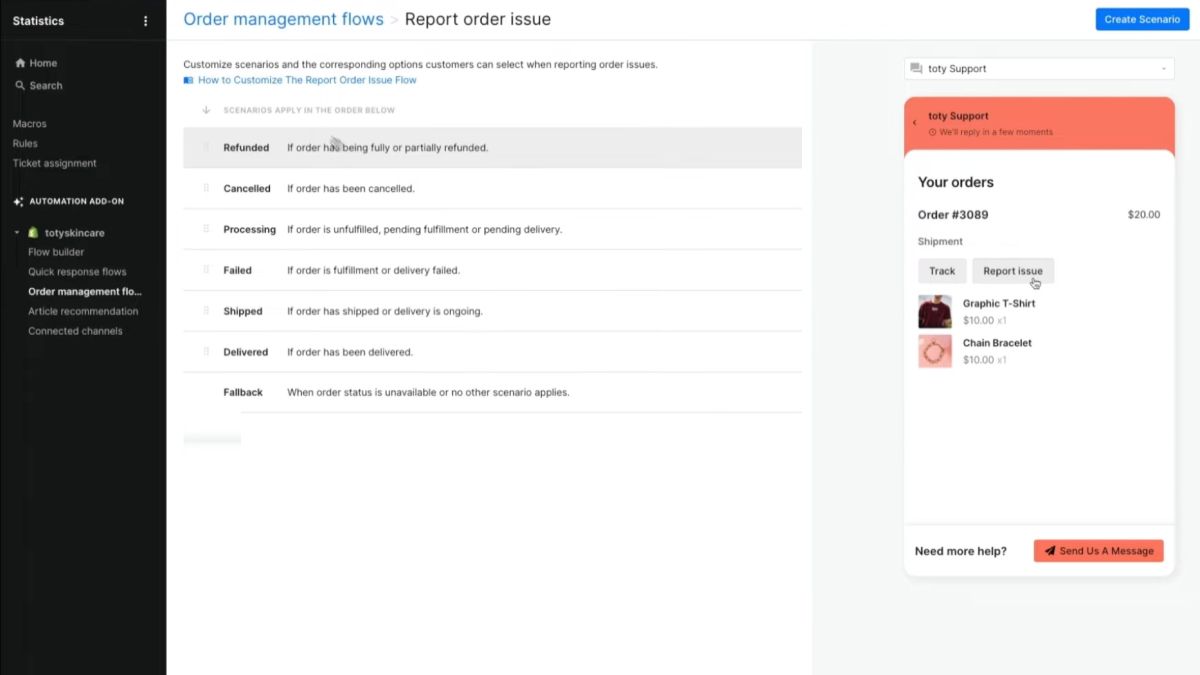
Best for: Stores where repetitive support requests regularly require someone to make an actual change in Shopify or another connected system.
Gorgias AI Agent goes beyond answering tickets. Its Actions can cancel eligible orders, change shipping addresses, remove or replace items, reship lost or damaged orders, and add order notes in Shopify Store. Merchants control when those Actions can run through Skills, Guidance, conditions, and confirmation rules rather than giving the agent unrestricted store access.
Customer: I entered the wrong shipping address.
For an eligible unfulfilled order, AI Agents for Shopify Stores can confirm the corrected address with the shopper, update it, and reply once the change is complete. That matters for requests where waiting for a human response could mean missing the fulfillment window.
The useful nuance is what happens at the edges. Order cancellations and address changes depend on the order still being editable.
A replacement can currently swap one item at a time, and if the new item costs more, Gorgias hands the ticket to a person to collect the additional payment. A Shopify-side cancellation also does not automatically cancel the order in an external 3PL unless that system is included in the workflow.
Gorgias Actions can also contain multiple steps across connected apps. A support workflow could update Shopify and then continue into a fulfillment or subscription system, with conditions controlling when each step runs. Irreversible Actions such as order cancellation have customer confirmation enabled automatically.
When the agent cannot complete the request safely, Gorgias can hand the conversation to the support team. Handoffs can occur when confidence is low, the customer asks for a person, frustration is detected, or the conversation matches an escalation topic.
Biggest advantage
Gorgias can turn a support request into a controlled operational workflow instead of stopping at an answer or ticket classification.
Biggest limitation
The automation only goes as far as the Actions, conditions, and connected systems the merchant has configured. Order state, payment differences, fulfillment systems, and other exceptions can still force a human handoff.
8. Klaviyo: best for Shopify marketing automation
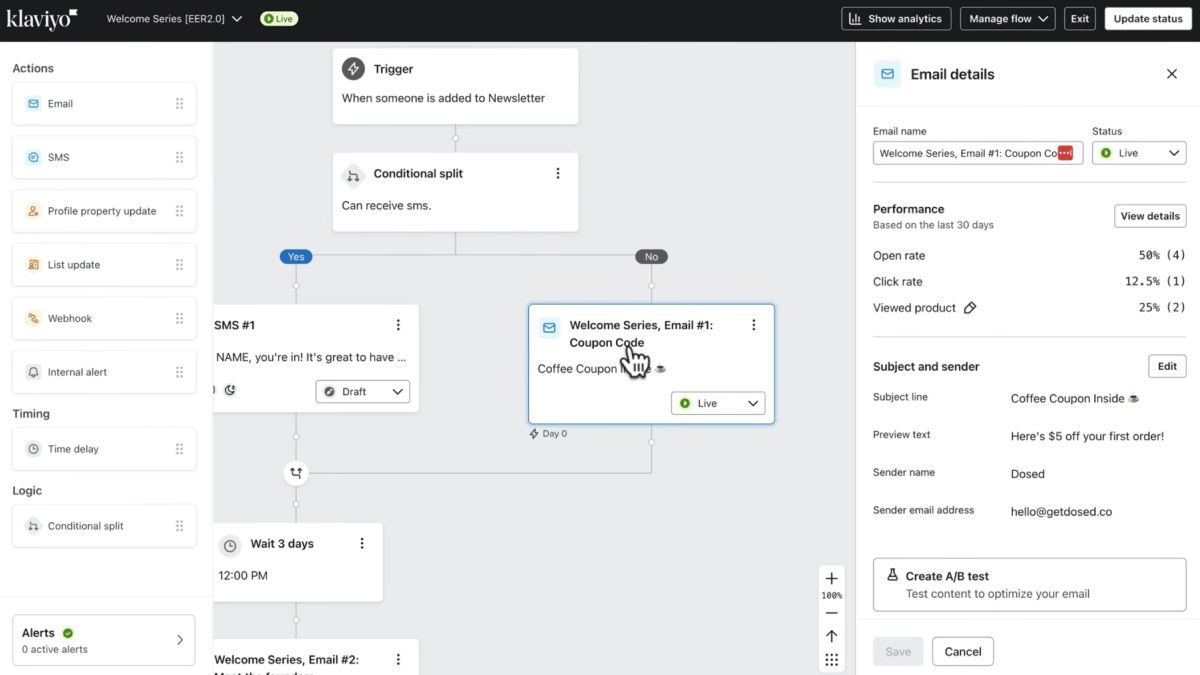
Best for: Shopify brands that want lifecycle automation, campaign operations, and customer communication running from the same customer-data layer.
Klaviyo spans three different automation models.
Traditional Flows handle predictable lifecycle automation. They trigger from customer events, list or segment membership, or profile dates, then run predefined messaging such as welcome sequences, abandoned checkout, post-purchase, browse abandonment, and win-back campaigns.
With Shopify connected, customer and event data sync into Klaviyo in near real time, which is what makes those flows responsive to store behavior.
Composer handles the work that needs interpretation. A marketer can ask it to analyze account performance, identify an underperforming flow or audience opportunity, build a campaign, edit segments, or prepare a cross-channel campaign from a plain-language brief.
As of September 2026, Composer can also run SQL-backed analysis with citations, save reusable Skills, and schedule recurring tasks such as monthly performance reviews. Campaigns still remain under marketer control rather than publishing blindly.
Find the lifecycle campaign with the biggest performance problem, explain what's wrong, and build the campaign you'd use to address it.
Customer Agent works on the shopper-facing side. It can answer product questions, recommend products, track orders, edit supported orders, process returns and exchanges, manage subscriptions, and hand conversations to a person when needed.
Its Skills activate only when their prerequisites are available. Shopify unlocks product recommendations and order tracking, order editing needs Shopify edit permissions, returns require Loop or AfterShip, and subscriptions require Recharge or Skio.
Connecting Klaviyo doesn’t automatically give Customer Agent every service capability. Each operational Skill depends on the data, permissions, or integration needed to complete that job.
The stronger reason to use Klaviyo, though, is that Composer and Customer Agent share the same customer context across marketing and service. The marketing agent and shopper-facing agent aren’t working from separate versions of the customer relationship.
Biggest advantage
Klaviyo combines deterministic lifecycle flows with marketer-facing and customer-facing agents on top of the same customer data.
Biggest limitation
Its automation depth is concentrated around lifecycle marketing and customer communication. Customer Agent's operational reach still depends on the Shopify permissions and third-party integrations connected to it.
Shopify automation tools compared
Five Shopify automation models and when each one fits
Shopify automation isn’t one category. Flow handles predefined rules, Zapier connects workflows across apps, Mechanic handles custom logic, Matrixify handles structured bulk jobs, and AI agents handle tasks that require interpretation.
None is inherently more advanced than another. The right model depends on whether the job needs a fixed rule, cross-app coordination, custom code, batch processing, or judgment.
What Shopify tasks should you automate?
Automate tasks that are repetitive, time-consuming, error-prone, or easy to define with clear inputs and permissions.
Keep human review for actions that are difficult to reverse, affect customers or revenue directly, rely on incomplete context, or regularly produce exceptions.
Rules-based automation vs AI agents
Use rules-based automation when the correct response can be defined before the workflow runs. If an order exceeds $500, tag it High Value. There is nothing for an AI agent to interpret.
Use an AI agent when the system has to work out what to do from context. Finding a promising product, investigating an unusual sales drop, or building an offer from a source URL requires interpretation rather than a fixed condition.
And don't force either model onto a bulk-data job. Updating 50,000 catalog rows from a structured file is better suited to a batch tool such as Matrixify.
The useful question isn't “Can AI automate this?” It's what kind of automation does this job actually require?
What does each tool actually require to set up?
- Shopify Flow. No-code visual workflow builder, ships with templates, and Sidekick can generate a starting workflow from a plain-language description.
- Zapier. Connect Shopify and the external accounts involved. Shopify is a premium app on Zapier, so this needs a paid Zapier plan, not the free tier.
- Mechanic. Ready-made tasks from its library are close to plug-and-play. Custom logic needs comfort with Liquid and the Shopify Admin API.
- Matrixify. Spreadsheet or file-driven, works best when the source data is already structured and clean.
- PagePilot MCP. Needs a PagePilot account with the applicable paid plan for the research features, plus an MCP-compatible AI client, ChatGPT or Claude, for the chained actions.
- Gorgias. Connected-app Actions need to be exposed through a Skill or Guidance. Custom Actions can also run automatically based on their configured purpose, though adding them to a Skill gives tighter control over when they fire. Conditions and customer-confirmation rules are set per Action.
- Klaviyo. Customer Agent's operational reach depends on what's connected alongside it, each capability needs its own integration rather than working out of the box.
What happens when Shopify automation fails?
Good automation needs a recovery path, not just a trigger. Before relying on a workflow, check whether you can see failed runs, retry them, trace what changed, and escalate exceptions instead of letting them fail silently.
Shopify Flow keeps execution logs for 14 days, automatically retries some transient failures, and allows failed runs to be retried manually. A separate error workflow can also send an email, Slack message, or Shopify alert.
Mechanic exposes error events for failed tasks and actions, while Matrixify keeps job history and import-result files that show what succeeded or failed during a batch operation.
Gorgias handles failure differently because a customer is involved. When the agent can't resolve a request reliably, encounters an escalation condition, detects a sensitive or highly frustrated conversation, or receives a request for a person, it can hand the conversation to the support team.
Best Shopify automation tools for small stores
Start with Shopify Flow for repetitive rules like tagging, alerts, and order routing. Add Sidekick when the task needs store context or judgment rather than another fixed workflow.
Bring in a specialist only when the bottleneck is clear. Specifically, PagePilot for frequent product launches, Gorgias for support volume, Klaviyo for lifecycle marketing, Zapier for cross-app workflows, Matrixify for bulk catalog changes, and Mechanic for custom backend logic.
For a small store, the best automation stack is usually the smallest one that removes a real operational bottleneck.
How to automate a Shopify store step by step
Map the repetitive work. List what gets done daily, weekly, per order, per product, per customer.
Separate rules from judgment. Does the correct action always follow a clear rule? Yes, use Flow, Zapier, or Mechanic. No, an AI agent may be worth it.
Identify bulk-data workflows. Use a structured batch tool where that's actually the job.
Identify specialist workflows. Product launches, support, email marketing, each probably wants its own tool.
Set permission boundaries. Define what each tool can read, draft, edit, publish, refund, or cancel.
Keep human review where consequences are high.
Measure actual savings. Hours saved, errors reduced, tickets automated, launch time, fulfillment time, revenue impact.
Example: how a Shopify automation stack can work together
A Shopify automation stack becomes useful when each tool owns a different handoff rather than duplicating the same work.
The point is not to run seven automation tools by default. Each one should enter the stack only when a specific workflow needs a different execution model.
Are Shopify automation tools worth it?
Worth it when the workflow happens often enough to justify setting it up, not just because a tool exists.
- Shopify Flow. Usually an easy win, native rule-based automation removes real repetitive work at close to no cost.
- PagePilot. Research time saved, page-build time saved, launches completed, manual handoffs eliminated.
- Gorgias. Tickets automatically resolved, support hours saved, response time.
- Klaviyo. Lifecycle revenue, campaign-production time.
- Matrixify. Hours saved on bulk updates, errors avoided.