

Shopify is worth it in 2026 for people who want to build a dedicated online store without managing hosting, checkout software, security, and ecommerce integrations separately.
Shopify Basic costs $39/month in the US with monthly billing, and that includes the core tools needed to sell physical or digital products.
But paying for Shopify and running a profitable store are two different things.
You'll still need products people want, reliable suppliers, a way to reach customers, and enough margin to cover fulfillment, payment fees, and marketing.
For someone already preparing to sell, Shopify can remove a substantial amount of technical work. For someone who hasn't chosen a product or researched demand, paying for a store may be premature.
Here's what Shopify actually provides, what it costs in 2026, and how to decide whether it's worth paying for.
Is Shopify Worth It in 2026?
Yes, Shopify is worth it for merchants who need a complete ecommerce platform and plan to sell products regularly. It's particularly useful for businesses that want their own storefront, checkout, inventory management, order processing, and integrations without maintaining separate technical systems.
It's a less attractive purchase when the business only needs a basic website, sells occasionally, or hasn't progressed beyond an untested product idea.
Shopify's biggest advantage is that its ecommerce infrastructure is already connected.
Its main financial drawback isn't necessarily the subscription. It's how easily merchants can accumulate expenses for apps, design work, marketing, and other services before knowing whether their products will sell.
What Do You Actually Get With Shopify?
Shopify includes much more than a website builder. It provides the infrastructure for displaying products, accepting payments, processing orders, managing inventory, and communicating with customers.
Here's what the subscription covers and where additional tools may become useful.
1. A Hosted Storefront With Checkout and Order Management
Shopify hosts your website and maintains the underlying ecommerce infrastructure.
On its full online-store plans, you can:
- Create products and variants.
- Organize products into collections.
- Track inventory across supported locations.
- Configure payments and checkout.
- Set shipping rates and delivery options.
- Manage orders, refunds, and customer information.
- Offer discounts and gift cards.
- Connect supported sales channels.
- Review sales and store analytics.
Shopify also provides SSL certificates and hosting as part of the platform.
You don't need to configure a separate web host, install shopping-cart software, or arrange the basic checkout infrastructure yourself.
That saves setup work, particularly for merchants who don't have technical experience.
However, you're still responsible for configuring the store correctly. Payment eligibility, shipping rules, applicable taxes, product compliance, and customer policies remain business responsibilities.
2. Free Themes and Store Design Tools
You don't need to purchase a premium Shopify theme to launch a store.
Shopify provides free themes, including Dawn, Horizon, Refresh, and Craft. These support product pages, collection layouts, imagery, and the main shopping features required for many stores.
Merchants can customize colors, typography, sections, and content through the theme editor.
Premium themes are available for businesses with more specialized design or merchandising requirements.
For a first store, a free theme is a practical choice. Spending several hundred dollars on a premium design before validating the product can leave less money for the parts of the business that actually need testing.
3. Built-In Marketing and Analytics
Shopify provides several features that beginners often assume require paid applications.
These include:
- Discount codes and promotions.
- Customer segments.
- Store analytics and sales reports.
- Abandoned checkout recovery.
- Email campaigns through Shopify Messaging.
- Marketing-related automations.
- Integrations with supported advertising and selling channels.
One particularly useful benefit is Shopify Messaging.
Stores on Basic, Grow, Advanced, and Plus currently receive 10,000 free marketing emails each calendar month.
After that allowance, additional emails start at $1 per 1,000 emails for the first paid-volume tier.
Shopify also states that abandoned checkout automations are free and don't count toward the monthly email allowance.
That means a new merchant can begin sending campaigns without immediately subscribing to another email marketing platform.
More sophisticated segmentation, SMS campaigns, or specialized automation may still require extra spending.
Source: Shopify Messaging email pricing.
4. Access to Shopify's App Ecosystem
Shopify's App Store is one of the clearest reasons to choose the platform for a business expected to grow.
Applications cover functions such as:
- Dropshipping and supplier fulfillment.
- Customer reviews.
- Subscriptions.
- Product bundles and upsells.
- Landing-page design.
- Customer support.
- Email and SMS marketing.
- SEO and analytics.
- Shipping and returns.
- Product-page generation.
A business selling subscription products has different requirements from one selling handmade jewelry or testing dropshipping products.
Shopify allows merchants to add functionality according to those requirements.
The drawback is that a store can become expensive when it relies on several paid apps.
Before subscribing to anything, check whether Shopify already provides the feature or whether an existing app can handle it.
5. Shopify's AI Features in 2026
Shopify now includes AI-assisted tools for store management, content creation, and design.
Shopify Magic helps generate or edit content in supported parts of the platform.
Sidekick assists with administrative tasks, store information, and supported content or code-related workflows.
In October 2026, Shopify also introduced Canvas, a new visual workspace for customizing an online store with Sidekick.
Canvas lets eligible merchants work across storefront pages and use AI-assisted editing to make design changes.
However, Canvas isn't universally available or a replacement for every existing design tool.
It launched on October 1, 2026 and remains in early access. Shopify's current requirements state that:
- Canvas works with Shopify-developed and custom themes, not third-party themes.
- It requires desktop access.
- App blocks and embeds can't currently be configured inside Canvas.
- Market-specific theme customization isn't supported in Canvas.
- Themes edited through Canvas don't receive ordinary theme updates.
These restrictions matter if your store already uses third-party theme components or specialized applications.
Also, AI-generated descriptions and product information must be reviewed. Shopify explicitly warns that generated copy can include inaccurate benefits, specifications, or guarantees.
AI can reduce repetitive work, but it doesn't remove the merchant's responsibility for what appears on the website.
Sources: Shopify's Canvas introduction and Canvas requirements.
How Much Does Shopify Really Cost in 2026?
Shopify Basic costs $39/month with monthly billing in the US. Grow costs $105/month, and Advanced costs $399/month.
Annual billing lowers the equivalent monthly price, but the merchant pays for the annual subscription.
Shopify Pricing Plans in 2026
US pricing checked October 12, 2026. Rates and billing terms can differ by country.
Basic includes a full online store, checkout, product and inventory management, themes, marketing tools, and supported selling channels.
Grow adds features including more staff access and lower standard Shopify Payments card rates.
Advanced adds capabilities intended for more complex operations, including additional international selling and shipping functionality.
Shopify Plus is available for much larger or more complex businesses, but it's unnecessary for most merchants evaluating their first store.
Source: Shopify's official pricing.
What Costs Extra?
The subscription is only one part of the operating budget.
Shopify gives your store a default myshopify.com address.
You can use it without purchasing another domain. A branded custom domain is a separate expense unless covered by a specific offer.
Likewise, Shopify's hosting is included, but inventory, product samples, advertising, and fulfillment are not.
What Are Shopify's Payment Processing Fees?
For US merchants using Shopify Payments, current standard online card rates start at:
The two columns represent different charges.
Payment processing fees are what the payment provider charges for handling an eligible transaction.
Third-party transaction fees are additional Shopify charges that may apply when using an external payment provider.
For qualifying transactions processed through Shopify Payments, Shopify generally doesn't charge its additional third-party transaction fee.
Consider a $40 order paid with a standard eligible US card on Shopify Basic:
The example does not add the separate 2% third-party transaction fee because the payment is processed through Shopify Payments.
If the merchant uses an external gateway, both the gateway's processing fees and Shopify's applicable third-party transaction charge may need to be considered.
Payment rates also vary by country, payment method, card type, and other transaction characteristics.
Source: Shopify's third-party transaction fee rules.
Can You Use Shopify for Free?
Shopify currently advertises a three-day free trial followed by a promotional period of $1/month for three months for eligible new merchants.
Those offers are temporary and subject to the current signup terms.
Two other options are worth understanding.
Shopify Starter: This simplified social-selling plan still appears in Shopify documentation, but Shopify states that it is no longer available to new stores.
Shopify Agentic: This newer plan has no monthly subscription fee and allows eligible businesses to sell through supported AI channels. Merchants can prepare a Shopify online store on the plan, but cannot publish that regular storefront or accept orders through its online-store checkout without upgrading to a paid subscription.
Agentic isn't a free replacement for Shopify Basic.
Sources: Shopify Starter and Shopify Agentic.
Is Shopify Worth It for Beginners?
Yes, Shopify is a good choice for beginners who want to operate an independent online store without managing the technical infrastructure themselves.
You can select a theme, add products, configure payment methods, set shipping rules, and publish a store without writing code.
Shopify also provides documentation, tutorials, and customer support to help merchants learn the platform.
That makes the software approachable.
But using Shopify and running an ecommerce business require different skills.
What Beginners Can Do Without a Developer
A new store owner can handle most standard setup tasks through Shopify's admin:
- Upload products, photos, and descriptions.
- Configure variants such as color and size.
- Set inventory quantities.
- Create product collections.
- Customize a free theme.
- Connect a payment provider.
- Configure shipping rates.
- Publish return and privacy policies.
- Process orders and refunds.
- Review sales data.
The platform handles much of the infrastructure that would otherwise need separate services.
Where Beginners Tend to Struggle
The difficult part often begins before the first sale.
Choosing a supplier, researching demand, setting prices, and understanding advertising costs require decisions Shopify cannot make on the merchant's behalf.
For example, a beginner may spend several days choosing a theme, building a logo, and installing apps before discovering that their product costs too much to sell profitably.
A more useful sequence is to understand the product and its economics first, then build the store around that information.
Shopify makes running an ecommerce store easier. It doesn't make every ecommerce business viable.
Is Shopify Good for Dropshipping in 2026?
Shopify remains a strong dropshipping platform because merchants can connect suppliers, import products, manage orders, and coordinate fulfillment through supported applications and integrations.
Dropshipping means the merchant sells products without keeping the inventory personally. When a customer orders, the supplier receives the order information and ships the product directly to the customer.
Shopify supports several approaches.
1. Shopify Collective
Shopify Collective allows eligible Shopify merchants to source products from other Shopify suppliers and have those suppliers fulfill orders.
The service has specific eligibility requirements involving supported countries, currencies, Shopify Payments, and store configuration.
Retailers generally need to operate in the same country and currency as the supplier they're connecting with.
It's not a universal supplier network available to every store.
Source: Shopify Collective requirements.
2. Third-Party Dropshipping Applications
Shopify supports applications that connect merchants with suppliers, product catalogs, inventory information, and fulfillment workflows.
Some tools help import product information. Others send orders to suppliers or provide tracking updates.
The functionality and fees depend on the application and supplier.
Before choosing one, check whether it supports your products, destination countries, return process, and required shipping times.
3. Direct Supplier Relationships
A merchant can also work directly with a manufacturer, wholesaler, or distributor.
That may involve manual order forwarding or a custom integration.
It's an option for businesses that want more control over supplier selection and product sourcing.
What Shopify Doesn't Handle for Dropshippers
Shopify doesn't automatically guarantee that the supplier will deliver the correct product, ship on time, or accept returns.
The merchant remains responsible for communicating with customers and meeting the obligations that apply to their business.
Before listing a dropshipping product, check:
- Sample quality and product accuracy.
- Shipping origin and realistic delivery times.
- Stock availability and synchronization.
- Return and refund arrangements.
- Product safety and applicable selling restrictions.
- Supplier charges and expected margins.
- Customer support responsibilities.
A product that appears profitable in a spreadsheet may become unprofitable after delivery problems, returns, and acquisition costs.
Shopify provides the tools to manage the store. Supplier reliability still has to be established.
For merchants frequently preparing new product pages, PagePilot can help generate editable Shopify product-page drafts from supported supplier links. It doesn't replace the supplier or fulfill orders.
Our guide to launching a product with AI explains how to connect product research, page creation, pricing, and publication without treating automation as a substitute for verification.
What Do You Actually Need to Succeed on Shopify?
A Shopify store needs more than an attractive homepage.
To give an ecommerce business a credible chance, you need evidence of customer demand, viable margins, an understandable offer, a way to reach buyers, and reliable fulfillment.
1. A Product People Are Willing to Buy
A trending product category isn't enough.
You need reasons to believe customers will purchase your specific product at your intended price.
Useful evidence might include:
- Existing demand for comparable products.
- Customer reviews identifying unmet needs.
- Discussions revealing recurring problems.
- Feedback on product samples.
- Competitor pricing and positioning.
- Early inquiries or purchases from a relevant audience.
For instance, discovering that portable blenders are popular isn't the same as proving that customers want your particular blender at $49.
Check the actual product's features, quality, alternatives, and customer expectations.
2. Enough Margin After Variable Costs
Revenue is not profit.
A store making $2,000 in sales may still lose money after inventory, shipping, fees, advertising, and refunds.
Here's a hypothetical order for a product selling at $40.
This example assumes a standard eligible US card transaction on Shopify Basic, no additional third-party transaction fee, and no separately charged sales tax. All non-payment costs are hypothetical.
The business keeps $5.54 per order to cover Shopify, paid apps, and other fixed costs before reaching operating profit.
At $39/month for Shopify Basic, the break-even calculation for the subscription alone is:
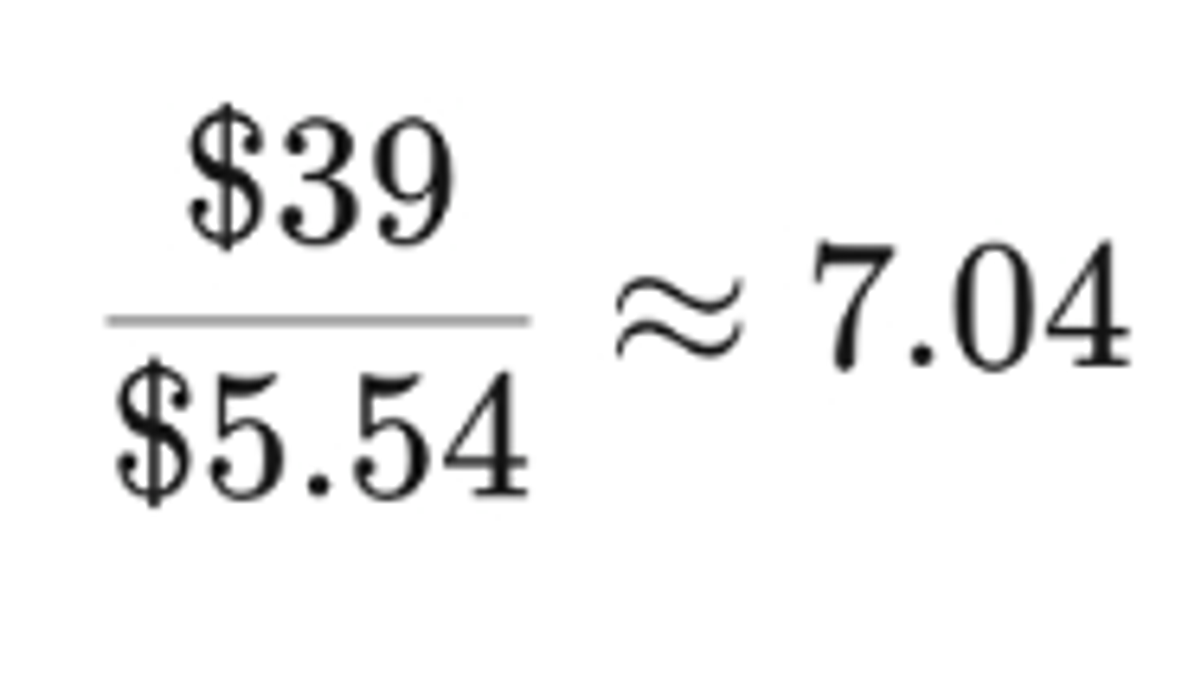
Since you cannot receive a fraction of an order, the merchant needs eight orders per month at that contribution level to cover the Basic subscription.
That does not mean the business becomes profitable after eight orders. It still has other fixed expenses and potentially additional operating costs.
The more important lesson is that software cost must be evaluated against the contribution each sale produces.
3. A Clear and Credible Offer
A product and an offer aren't the same thing.
The product is what you're selling.
The offer includes its price, presentation, included items, shipping terms, and any relevant warranty, bundle, or other benefit.
For example, two stores may sell similar desk lamps.
One might provide clear dimensions, lighting specifications, warranty details, and accurate delivery information.
The other might display only a supplier photograph and a generic description.
Even before considering price, the first store gives customers more information to evaluate.
Focus on genuine product differences and credible evidence rather than invented scarcity or exaggerated claims.
4. A Way to Reach Customers
Shopify doesn't automatically send shoppers to your store just because you've published it.
You need a customer acquisition strategy.
That could include:
- Search engine optimization.
- Organic social content.
- Paid advertising.
- Influencer or creator partnerships.
- Email marketing.
- Affiliate programs.
- Referrals and existing customer relationships.
The right channel is the one that reaches people who are likely to want the product.
A business with an existing audience may begin generating sales through email or social channels.
A store relying entirely on paid advertising must account for the cost of acquiring every customer.
Don't increase ad spending simply because traffic is growing. Measure whether that traffic generates enough contribution profit to justify its cost.
5. Product Pages That Answer Buying Questions
Customers need useful information before purchasing.
A product page should make the essential details easy to find.
These typically include:
- Product name and price.
- Accurate images from useful angles.
- Important specifications and variants.
- Relevant benefits supported by the actual product.
- Genuine customer reviews where available.
- Shipping, returns, and warranty information.
- Clear purchasing controls.
- Answers to common product questions.
For a household accessory, customers may need dimensions and compatibility information.
For skincare, ingredients and usage instructions may matter more.
For electronics, technical specifications and included accessories can be decisive.
There is no reason to make every product page equally long. Provide enough information for the specific buying decision.
For practical inspiration, see our Shopify product page examples.
6. Fulfillment and Customer Service You Can Deliver
Customers judge the entire purchase experience, not just the website.
A merchant needs to know when products will ship, how tracking works, what happens when stock is unavailable, and how returns are handled.
This is particularly important for dropshipping because the supplier performs much of the physical fulfillment.
A well-designed Shopify store cannot compensate for a supplier that repeatedly misses delivery commitments.
Treat fulfillment and support as part of the business model from the beginning.
Is Shopify Worth It If You Have No Sales Yet?
Shopify can be worth paying for before your first sale when you have a specific product, know who you want to sell it to, and are ready to test the offer.
However, if you haven't selected a product or examined its potential demand, there is little reason to accumulate monthly app and theme expenses immediately.
You can complete substantial preparation before operating a live store.
What to Do Before Paying for a Full Setup
A sensible sequence is:
Select a product or small product category.
Research competing offers and likely customers.
Confirm suppliers or inventory arrangements.
Calculate the contribution margin.
Obtain or inspect product samples where relevant.
Prepare accurate product content and policies.
Choose a free Shopify theme.
Configure checkout, shipping, and essential settings.
Launch a controlled acquisition test with a defined budget.
You don't need a premium theme, several upsell applications, and expensive attribution software to complete these steps.
What If You're Starting With a Very Small Budget?
Prioritize the expenses that establish whether your product can be sold responsibly and profitably.
Product samples, reliable supplier information, and accurate delivery estimates may matter more than a polished visual design.
Use the Shopify trial to explore the interface and prepare your store, while recognizing that an ongoing paid plan is needed for a normal live online store.
It's reasonable to delay launch if you cannot fund basic operations or resolve supplier uncertainties.
That is a business decision, not a limitation of Shopify's software.
When Is Shopify Worth the Money, and When Should You Skip It?
Shopify is particularly valuable when ecommerce is a central part of the business.
It's less compelling when selling products is occasional or secondary to another activity.
Is Shopify Worth It for a Small Business?
Shopify makes sense for a small business that sells physical or digital products regularly and wants control over its own storefront.
A local specialty shop, independent apparel brand, or growing product business may benefit from unified inventory, online checkout, and customer management.
A consultant or service provider who only needs an informational website and a contact form may be better served by a simpler website builder.
Is Shopify Worth It for Scaling?
Shopify can support growth through its themes, apps, selling channels, reporting, inventory tools, and staff permissions.
The platform also provides higher subscription tiers for merchants with more complex requirements.
However, growth can increase software and operational expenses.
A brand entering new markets may need specialized shipping, tax, translation, customer support, or merchandising tools.
The relevant question becomes whether each additional feature supports a real operational need.
Upgrading the Shopify plan simply because sales are rising isn't always necessary. Compare the cost of the higher tier with the specific functionality and payment-rate savings it provides.
Shopify vs. Cheaper Alternatives: Which Should You Choose?
Shopify isn't the only way to sell products online.
Other platforms can be more appropriate when you already have a website, want greater technical control, or primarily sell services with a small product offering.
However, a lower advertised subscription doesn't guarantee a lower total cost.
Shopify vs. WooCommerce
WooCommerce is free, open-source ecommerce software for WordPress.
That makes it attractive to merchants who already know WordPress or want deeper control over hosting and customization.
However, the core software being free doesn't mean the entire store is free.
WooCommerce's official pricing documentation identifies hosting, payment processing, and extensions as additional expenses.
Shopify is the simpler managed option for merchants who prefer not to maintain that infrastructure themselves.
Source: WooCommerce pricing.
Shopify vs. Wix
Wix is worth considering for businesses that need a general-purpose website with some ecommerce functionality.
It offers website design, content, scheduling, and business features alongside selling tools.
Wix allows merchants to create a website for free, but accepting ecommerce payments requires a suitable paid plan.
Shopify is more directly oriented toward businesses where products, orders, and retail operations are the main activity.
For a detailed comparison, see our guide to Wix vs. Shopify for ecommerce.
Shopify vs. Squarespace
Squarespace is relevant to creative businesses, service providers, and brands that prioritize a broader website experience.
It also supports ecommerce.
Its current website plan structure uses Basic, Core, Plus, and Advanced, replacing older Personal, Business, and Commerce plan names.
Shopify is worth considering when the business expects to depend heavily on specialized retail integrations or merchandising functionality.
Source: Squarespace's current ecommerce plan documentation.
Shopify vs. Ecwid
Ecwid can be particularly convenient when you already have a website and want to add ecommerce rather than rebuild it.
Its current plans include Starter, Venture, Business, and Unlimited.
The Starter tier supports up to ten products, while higher tiers expand product limits and functionality.
Ecwid may therefore be appropriate for a small existing website that needs basic online selling.
Shopify offers a different starting point: a complete commerce platform designed to operate as the center of the business.
Source: Ecwid pricing.
For more options, read our Shopify alternatives comparison.
How to Keep Shopify Costs Low as a Beginner
The most useful Shopify cost-saving strategy is to begin with the features you actually need, then add tools when you can identify the problem they solve.
Start With Basic and a Free Theme
Shopify Basic includes the core infrastructure required for a standard online store.
You don't need to upgrade simply because you expect the business to grow eventually.
Choose a free theme that presents your products clearly. Dawn is a suitable general-purpose starting point, while other free themes offer different visual styles and content layouts.
Use Shopify's Native Features First
Before paying for apps, explore Shopify's existing product editor, analytics, discounts, email campaigns, and marketing tools.
Shopify Messaging's included email allowance may be sufficient for an early-stage store.
A paid solution becomes more reasonable when the merchant needs capabilities that the existing platform cannot provide efficiently.
Avoid Overlapping App Subscriptions
A store may install several apps over time without checking whether they solve separate problems.
For example, a merchant might pay for two tools that both generate product descriptions, or maintain multiple apps for promotional widgets.
Review what each app provides, how often it's used, and whether its cost is justified.
Uninstalling software that no longer serves a purpose can be more valuable than searching for another all-in-one solution.
Validate Before Expanding Advertising
Don't assume that spending more will fix a weak offer.
Before increasing a campaign budget, review the product's contribution margin, the relevance of incoming traffic, and where visitors encounter purchasing problems.
If customers consistently need more product information, improve the page.
If the acquisition cost exceeds the contribution available from the order, revisit pricing, targeting, or the offer rather than simply increasing traffic.
Review the Total Cost Every Month
Look at:
- Shopify subscription charges.
- Paid app subscriptions and usage fees.
- Payment processing.
- Product and fulfillment costs.
- Advertising and creative costs.
- Refunds and customer support.
- Contribution profit after these expenses.
The objective isn't to spend as little as possible.
It's to spend on tools and activities that have a clear role in selling and delivering the product.
Final Verdict: Is Shopify Worth Buying?
Shopify is worth paying for when you're ready to run an ecommerce business and need a dependable system for products, checkout, inventory, and orders.
Start with Basic, a free theme, and Shopify's existing tools. Use the remaining budget to validate your products, improve the offer, and establish reliable fulfillment.
Additional software becomes valuable when it solves a specific problem.
For merchants repeatedly creating Shopify product pages from supplier links, PagePilot can help generate editable drafts and reduce repetitive page-building work.
But the fundamental decision remains the same: choose Shopify for its ecommerce infrastructure, and build the business case around what you sell, who will buy it, and whether each order makes financial sense.