


Debutify is worth considering if you want a Shopify theme with built-in cart, merchandising, and promotional features that would otherwise require several apps.
Its 2026 offering also includes an AI Store Builder and access to a library of 145 widgets and sections. But the full library isn't free, and paying for dozens of features makes little sense when your store only needs a few.
The real question is whether Debutify replaces enough tools to justify its subscription, particularly after promotional discounts expire.
This Debutify review covers its current pricing, most useful features, dropshipping suitability, and alternatives, including Shopify's free Dawn theme.
Debutify Review: The Quick Verdict
Our verdict: Debutify makes the most sense for merchants who can identify several included features they'll actively use. Stores that only need a clean product page, good navigation, and basic merchandising should compare its subscription against a free Shopify theme first.
What Is Debutify, and How Does It Work?
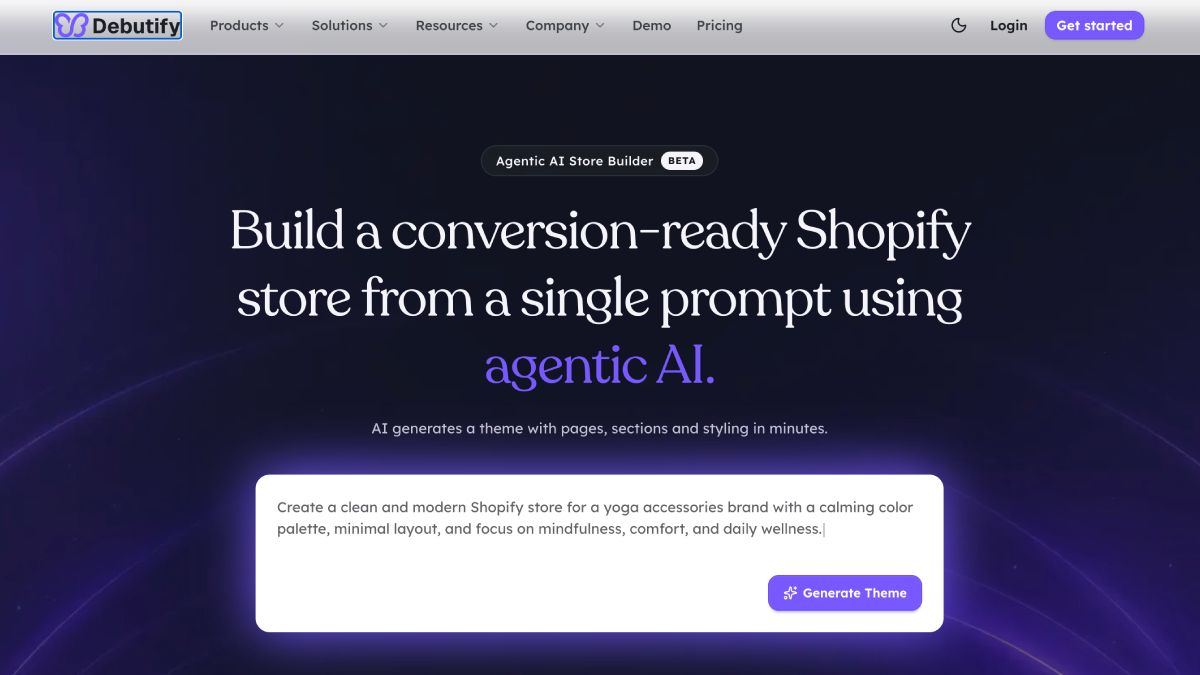
Debutify is a Shopify theme ecosystem combining storefront design, merchandising widgets, promotional features, and AI-assisted store creation.
It's especially relevant to ecommerce businesses that want common shopping features built into their theme rather than managed through a collection of standalone applications.
However, Debutify's product lineup is broader than its theme alone.
There are four parts worth distinguishing.
- Debutify Theme: The storefront theme that determines the overall design, layout, and presentation of the Shopify store.
- Widgets and sections: Features such as cart upsells, product tabs, sticky add-to-cart buttons, countdowns, navigation elements, and promotional sections.
- Agentic AI Store Builder: A tool for generating a store design and content from a description of the business or product.
- Standalone Debutify apps: Separate offerings, including Debutify Reviews and other dedicated functionality, which shouldn't automatically be treated as part of every theme subscription.
That distinction matters when evaluating cost. A theme subscription doesn't necessarily replace your email platform, reviews application, subscription app, or other specialist tools.
How Do You Set Up Debutify?
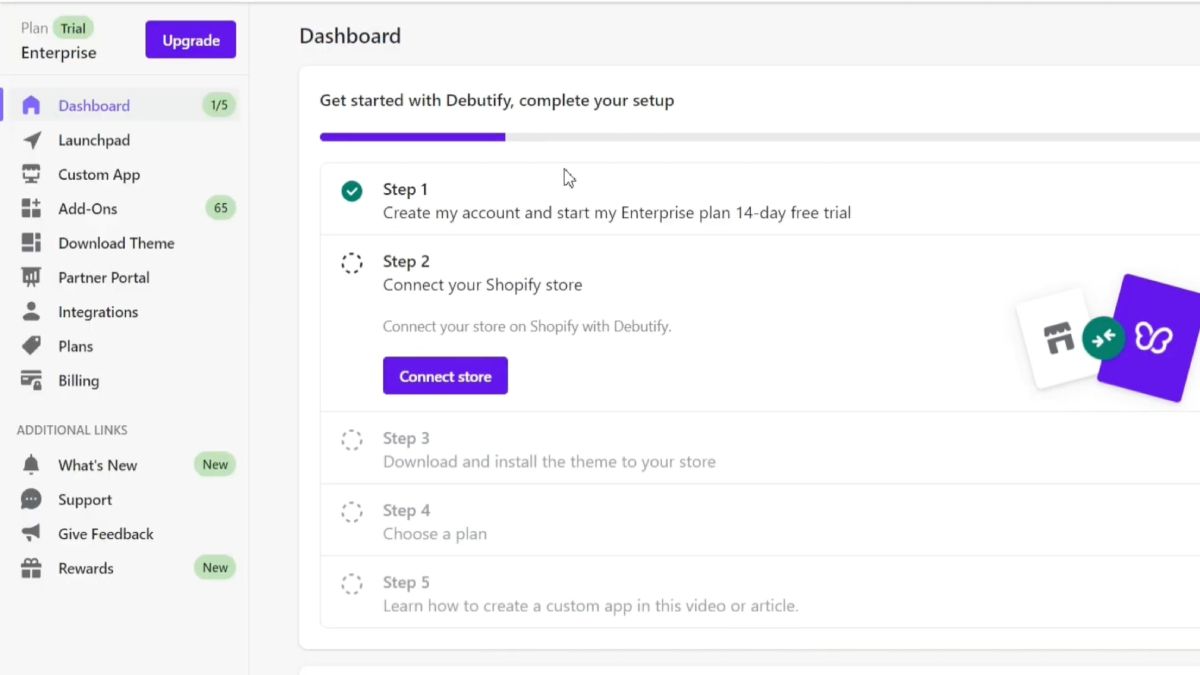
Debutify provides a theme setup and customization process for Shopify merchants.
The basic workflow is:
Choose a Debutify plan and connect your Shopify store.
Configure the theme or use the AI Store Builder.
Select the widgets and sections available under your plan.
Customize colors, typography, product layouts, and other storefront elements.
Review product and collection pages on desktop and mobile.
Test the cart, checkout, product variants, and integrations before publishing.
The theme can be customized without writing code for common design changes.
More advanced modifications may still require development work, especially when a merchant uses custom layouts or third-party applications.
Debutify also operates outside the official Shopify Theme Store. That means it's worth reviewing its own update process, account requirements, support terms, and compatibility guidance before subscribing.
What Does Debutify's AI Store Builder Do?
Debutify's Agentic AI Store Builder creates a Shopify storefront using a description of the merchant's niche or product.
According to Debutify, the process involves entering a prompt, generating store content and layouts, reviewing the results, and publishing to Shopify.
The builder can assist with homepage structure, copy, and other storefront elements. Debutify currently labels it a beta product.
That makes it useful for merchants who would otherwise start with an empty theme and manually configure every section.
But the generated store still needs attention.
Product specifications, shipping information, images, policies, offers, and supplier details must be checked before customers see them.
Debutify advertises very short generation times, but that shouldn't be confused with the time required to prepare a complete, reliable ecommerce business.
Debutify Pricing in 2026: How Much Does It Cost?
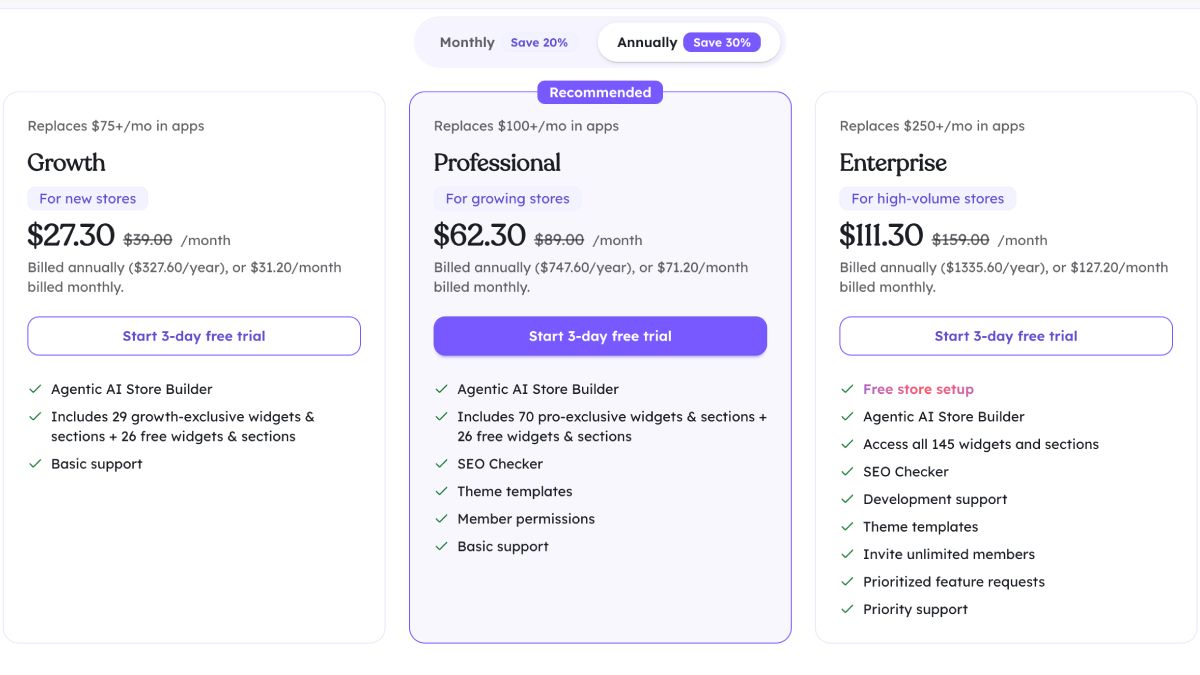
Debutify offers a free tier and three paid theme plans: Growth, Professional, and Enterprise.
The standard paid prices are $39, $89, and $159 per month, respectively. Debutify also advertises introductory discounts, so the amount shown at checkout may be lower than the regular plan price.
Here's the current structure.
Pricing checked October 9, 2026. The discounted annual equivalents reflect Debutify's advertised promotion at the time of review. Promotional pricing, introductory duration, and renewal terms should be confirmed at checkout.
All three paid plans advertise a three-day trial.
Debutify also publishes discounted monthly-billing offers, but those should not be confused with the annual promotion or regular subscription rates.
For a detailed look at longer-term costs, see our Debutify pricing breakdown.
What's Included in the Free Plan?
The Free tier provides 26 widgets and sections and a limited AI Store Builder allowance.
It lets merchants explore the Debutify ecosystem without paying for the full library.
However, many of the features associated with Debutify's paid conversion-tool positioning aren't included at this level.
The free tier also doesn't provide the same support or advanced account functionality as the paid packages.
It's useful for evaluating the theme, but don't assume a store can access the full 145-feature collection without upgrading.
Growth: Best for Stores That Need Selected Conversion Features
Growth expands the available library to 55 widgets and sections.
It also provides five AI Store Builder generations per month and basic support.
The most important question is whether the included premium features solve problems you currently handle with separate applications.
For example, a store wanting cart upsells, additional product information sections, or selected promotional widgets may find this tier useful.
But a merchant who only needs a standard catalog and a straightforward product page should compare Growth with Shopify's free themes before subscribing.
Professional: Best for More Extensive Store Customization
Professional expands the library to 96 widgets and sections.
It also adds functionality including:
- SEO Checker.
- Theme templates.
- Member permissions.
- Additional advanced widgets.
- Eight AI Store Builder generations per month.
This tier becomes more relevant when several of the Professional-level features are part of your actual store requirements.
A larger feature count isn't enough on its own. Compare the specific tools included with applications you already pay for.
Enterprise: Best for Teams Using the Full Feature Library
Enterprise unlocks Debutify's 145 widgets and sections.
Its additional benefits include priority support, expanded team access, development assistance, and ten AI Store Builder generations per month.
Debutify also advertises additional help for merchants maintaining certain older versions of the theme.
Enterprise is primarily worth evaluating when your team needs those operational capabilities or the complete widget library.
High traffic alone doesn't establish that Enterprise is the right plan.
How Much Does Debutify Really Cost?
The subscription price is only one part of the calculation.
You should also consider the apps you still need, theme setup, development work, and the cost of changing your existing storefront.
For example, imagine your store currently pays for these tools:
These are hypothetical amounts, not current vendor quotations.
If a Debutify plan replaces all four tools with suitable native widgets, the subscription may be easier to justify.
But suppose you only use a sticky add-to-cart feature. Paying for a more expensive bundle could cost substantially more than retaining a free theme and a single app.
There is another complication: a bundled widget isn't necessarily equivalent to every feature in a specialist application.
You may still need your existing tool for advanced targeting, analytics, integrations, or customization.
The money-saving calculation is straightforward: compare what you would stop paying for against the full Debutify cost. Don't count unused features as savings.
Also consider the renewal price rather than basing a long-term decision solely on an introductory discount.
Which Debutify Features Are Worth Paying For?
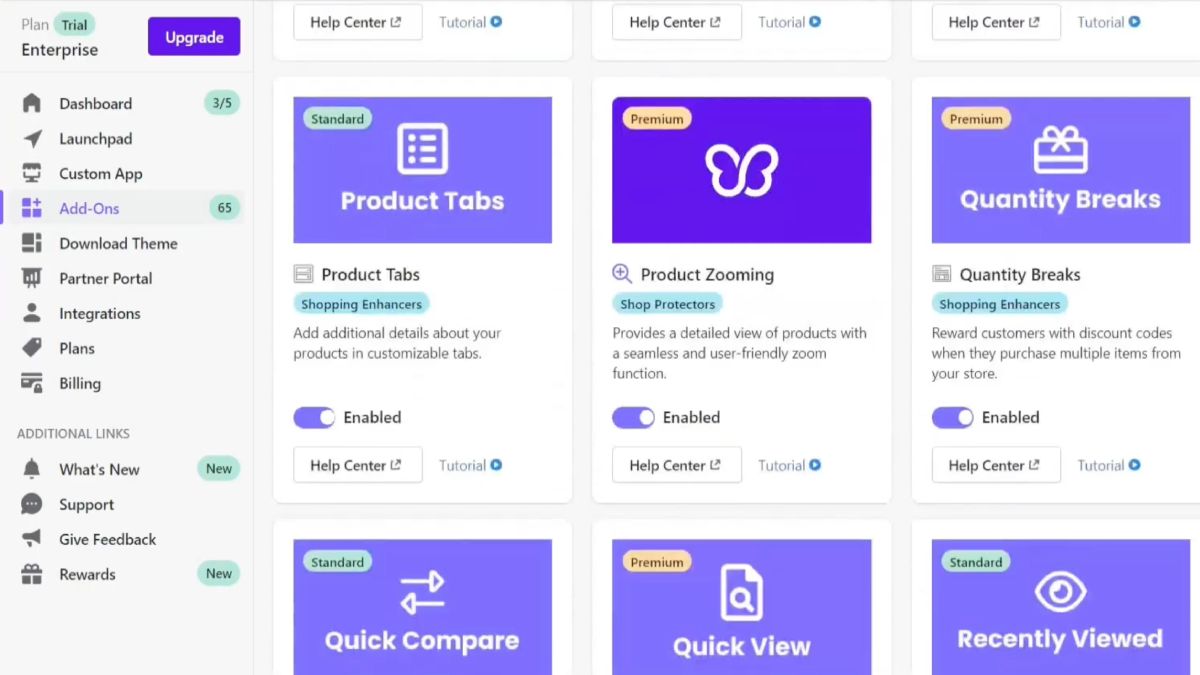
Debutify advertises 83 widgets and 62 sections.
Rather than reviewing all 145, it's more useful to identify the features that could replace something your store currently needs.
Product-Page and Merchandising Features
Debutify includes tools for presenting product information and helping shoppers navigate individual offers.
Examples from its widget library include:
- Product tabs.
- Product bullet points.
- Sticky add-to-cart.
- Swatches.
- Product recommendations.
- Recently viewed products.
- Quick view.
- Product zooming.
A product-tabs feature, for example, can separate descriptions, specifications, and shipping information without making the main product page excessively long.
Sticky add-to-cart keeps a purchase action available as the visitor moves through the page.
These features can be useful, particularly on mobile.
But don't assume they are missing from all free Shopify themes.
Shopify Dawn already supports several merchandising functions, including swatches, product videos, recommendations, image zooming, and size charts.
Debutify's value comes from the specific additional functionality and configurations you need, not merely from having the feature names on a list.
Cart and Upsell Features
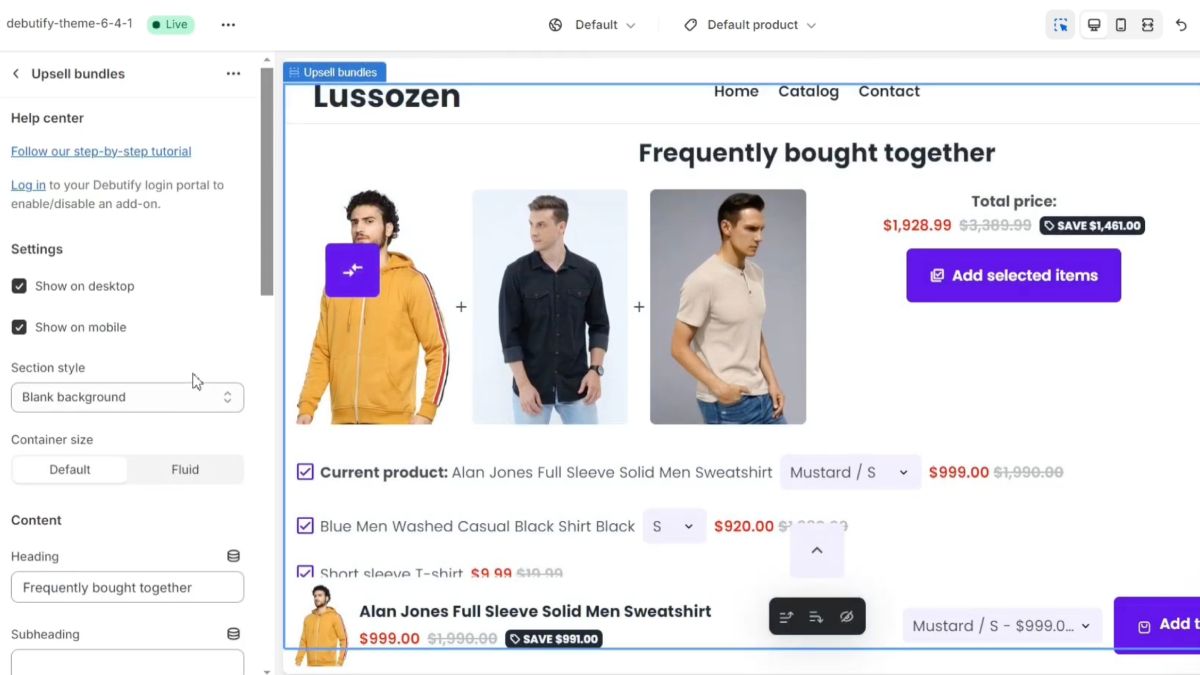
Debutify's cart-related widgets include features such as:
- Cart upsells.
- Cart goals.
- Cart notifications.
- Quantity-related promotions.
- Cart reminders.
- Shipping calculation.
These tools can help merchants present additional offers or information during the buying process.
Consider a skincare store selling a cleanser.
A cart upsell might offer a complementary moisturizer. A cart goal could communicate an available shipping threshold.
Neither guarantees that customers will purchase more.
An irrelevant upsell can create unnecessary distractions, while a poorly configured shipping threshold can confuse customers.
Evaluate whether the widget supports the offer you want to make and whether it works properly across mobile and desktop.
Trust and Promotional Widgets
Debutify also offers features such as guarantees, announcements, countdowns, sales notifications, testimonials, and other promotional elements.
These can communicate relevant information when used accurately.
For example, an announcement bar might inform visitors about a real shipping promotion.
A guarantee section can explain an actual refund policy.
A countdown should only represent a genuine deadline. Fake scarcity and fabricated purchase notifications can mislead shoppers and undermine trust.
The availability of a widget doesn't establish that it improves conversions.
Navigation and Store Design
Debutify provides additional sections for menus, featured collections, images, promotional content, and other storefront layouts.
These matter more for stores with several categories or collections than for a simple one-product store.
Before upgrading, compare Debutify's available navigation features with the theme you already use.
A mega menu, for example, is not exclusive to premium themes. Shopify's free Dawn theme includes one.
The real difference may be how much control you have over the layout, content, and behavior.
Debutify Pros and Cons
Debutify's principal strength is convenience. It gives merchants access to multiple storefront features in one ecosystem rather than requiring a separate application for every cart or product-page function.
Its main trade-off is the ongoing cost and the possibility of paying for features your store never uses.
What Are the Main Drawbacks of Debutify?
The biggest concern is whether the subscription provides enough additional value over a merchant's existing theme.
For example, a store already using Dawn, a specialist reviews app, and a small number of well-configured merchandising tools might gain little from replacing its current setup.
Changing themes also introduces practical work.
You'll need to inspect product templates, homepage sections, cart behavior, customizations, and integrations.
And because Debutify operates outside the Shopify Theme Store, merchants should understand its update and support process.
Is Debutify Good for Dropshipping?
Yes. Debutify can be a useful Shopify theme for dropshipping because it combines product-page, cart, and promotional tools that dropshippers often assemble through separate apps.
Its strongest fit is a merchant who wants a consistent storefront and plans to use several of those features.
Consider a store testing a small collection of travel accessories.
The merchant may want product tabs for dimensions and shipping information, a persistent add-to-cart button on mobile, a cart upsell for complementary items, and a clear announcement about delivery terms.
Debutify could provide several of those functions within the same theme ecosystem.
Its AI Store Builder may also reduce some of the manual setup involved in preparing a new storefront.
However, Debutify doesn't replace the operational parts of dropshipping.
You still need to:
- Research and verify products.
- Find reliable suppliers.
- Establish shipping and return arrangements.
- Maintain accurate inventory information.
- Fund and fulfill orders.
- Handle customer support.
- Test advertising and product demand.
When Is Debutify Overkill for Dropshipping?
A beginner validating their first product may not need a paid theme subscription.
If you're operating a simple one-product store with limited traffic, a free Shopify theme may already provide the basic structure you need.
The same applies to merchants whose principal problem is preparing new product pages rather than managing storewide widgets.
Debutify is easier to justify once you can identify which included features would actually reduce app spending or make your store easier to manage.
For ideas on structuring individual offers, see these Shopify product page examples.
Is Debutify Fast and SEO-Friendly?
Debutify can support a well-performing Shopify store, but its speed and SEO results depend on the installed theme version, enabled features, images, scripts, and other applications.
There isn't enough independent testing in this review to declare Debutify faster or slower than Dawn, Shrine, or another theme.
Does Debutify Slow Down Shopify?
Debutify advertises its integrated widgets as an alternative to adding multiple external apps.
That may simplify some setups, but fewer separate subscriptions don't automatically mean fewer scripts or better page performance.
A store using large hero videos, multiple animations, heavy image galleries, and numerous interactive features can still have performance problems.
Evaluate the actual storefront using Google PageSpeed Insights and Shopify's available performance reports.
For a meaningful comparison, test:
- The homepage.
- A representative product page.
- A collection page.
- Mobile performance.
- The same pages after activating important widgets.
Look at Core Web Vitals such as Largest Contentful Paint, Interaction to Next Paint, and Cumulative Layout Shift.
Don't judge a theme solely from a single Lighthouse run or an impressive score shown on a marketing page.
Is Debutify Good for Shopify SEO?
Debutify can support SEO through its storefront structure, navigation, mobile presentation, and available optimization features.
Professional and Enterprise also advertise an SEO Checker.
But many essential SEO capabilities come from Shopify itself, including editable product metadata, canonical handling, sitemaps, and standard storefront functionality.
Search performance also depends on product content, internal linking, crawlability, images, site architecture, and external factors.
A theme alone won't create useful product descriptions or guarantee rankings.
When choosing Debutify, check heading structure, mobile usability, navigation, structured data compatibility, and the performance of your actual templates.
Debutify vs Dawn: Do You Need a Paid Shopify Theme?
Dawn is the more economical starting point when your store needs a clean Shopify theme and standard ecommerce functionality. Debutify becomes more attractive when its paid widgets replace several features you would otherwise purchase separately.
It's a mistake to describe Dawn as a bare-bones theme with no meaningful ecommerce features.
Shopify's official Dawn listing includes product filtering, search, swatches, recommendations, image zooming, promo banners, and a mega menu.
Here's how the two compare.
Should Beginners Use Debutify or Dawn?
For a first Shopify store, start by listing the features you need.
If that's product information, variants, a clear buying button, recommended products, and normal store navigation, Dawn may already be sufficient.
If you need advanced cart interactions, specialized promotions, and other premium widgets, compare their cost individually against Debutify's subscription.
Also consider whether the features are available in Growth or require Professional or Enterprise.
A paid theme is only better value when its additional functionality is useful enough to justify the cost.
Our guide to Shopify apps that increase conversion rates can help identify when a specialized app is more appropriate than a theme bundle.
Debutify vs PagePilot: What's the Difference, and Can You Use Both?
Debutify and PagePilot serve different primary purposes, and they can be used together. Debutify provides the Shopify theme, storefront widgets, and AI-assisted store creation. PagePilot focuses on generating and editing Shopify product pages from supported product links.
Importantly, PagePilot's official help documentation explicitly lists Debutify among its supported Shopify themes.
That means merchants don't necessarily have to choose between them.
When Should You Use Both?
Consider a merchant running a dropshipping store with Debutify.
The merchant likes Debutify's navigation, cart layout, promotional widgets, and overall storefront appearance.
However, they also want to prepare new product pages from supplier links without manually writing and assembling each page.
PagePilot can help generate those drafts.
For example, a merchant could take a supported AliExpress product URL, generate a structured page with product copy and visuals, review the content, and import the result to Shopify.
Debutify remains the storefront theme.
This is useful for merchants who want to keep their store's overall structure while changing the product pages or offers they test.
What Should You Check Before Using PagePilot With Debutify?
Supported-theme status doesn't guarantee that every imported page will look identical to its preview.
PagePilot's documentation notes that Shopify themes can apply their own fonts, styles, and layout rules.
After importing a page, check the typography, spacing, images, product variants, add-to-cart behavior, mobile layout, and any Debutify widgets you expect to use.
Also note that PagePilot's current help documentation says users can create products during the free period but must move to a paid plan to import them into Shopify.
Already using Debutify? Explore PagePilot's AI Shopify page builder to prepare editable product pages from supported product links without replacing your entire store theme.
What Are the Best Debutify Alternatives?
The best Debutify alternative depends on which part of the product you want to replace. Dawn and Shrine are alternatives when you need a Shopify theme. PageFly and GemPages are more relevant when you want flexible page design. PagePilot makes sense when your priority is generating product pages from supplier or product URLs.
These tools aren't interchangeable, so compare them by the work you need done.
1. Shopify Dawn: Best Free Debutify Alternative
Dawn is a sensible choice for merchants who want a clean Shopify storefront without paying for an additional theme subscription.
It includes more native ecommerce features than many beginners realize, including product recommendations, swatches, enhanced search, filters, and a mega menu.
It's particularly suitable for stores that need a dependable starting point and prefer to add functionality selectively.
Main trade-off: Dawn doesn't include Debutify's complete collection of premium cart, promotional, and merchandising widgets.
Choose Dawn when your actual requirements are relatively simple and you don't want to pay for a bundle you may barely use.
2. Shrine: Best Direct Conversion-Theme Alternative
Shrine is a closer Debutify competitor because it also markets a Shopify theme built around ecommerce merchandising and conversion-oriented functionality.
It offers theme layouts and built-in selling features intended to reduce reliance on separate apps.
The main comparison should be between the exact features available under each product's current license, rather than the total number of widgets advertised.
Before purchasing Shrine, verify its current pricing, theme updates, support terms, and the functionality included in your selected version.
Main trade-off: Shrine is another theme commitment. It doesn't automatically eliminate the need for specialist apps or guarantee better conversion performance.
Choose Shrine when you specifically want another conversion-oriented theme and prefer its design, licensing model, or included functionality.
3. GemPages: Best for Custom Shopify Page Design
GemPages is a visual Shopify page builder for merchants who want more control over the design of individual pages.
It supports creating product pages, landing pages, and other storefront experiences without building everything directly through the standard theme editor.
This makes it relevant when your current theme is satisfactory but its page layouts are too restrictive.
Main trade-off: GemPages isn't a full replacement for the storefront theme. It introduces a separate page-building environment, subscription considerations, and potential integration requirements.
Choose GemPages when page-specific customization matters more than replacing the theme.
4. PageFly: Best for Flexible Drag-and-Drop Layouts
PageFly lets merchants create and edit Shopify pages using a visual builder.
It's useful for custom landing pages, product-page layouts, and promotional experiences that require more design freedom than the merchant's existing theme provides.
For example, a brand might want to create a dedicated landing page for a seasonal campaign without changing the rest of its storefront.
Main trade-off: Pages still need to be designed, configured, and maintained. PageFly doesn't replace all storewide theme functionality.
For a broader comparison, see our PageFly alternatives guide.
5. PagePilot: Best for AI-Assisted Product-Page Creation
PagePilot is worth considering when the bottleneck is preparing Shopify product pages rather than choosing a complete storefront theme.
It generates product-page drafts from supported supplier or product links and provides editing tools for copy, images, and layout elements.
That can be useful for merchants testing several products or preparing pages for different campaigns.
Main trade-off: PagePilot isn't a like-for-like Debutify theme replacement. It has its own subscription and doesn't replace every storewide widget Debutify offers.
However, merchants can use PagePilot with Debutify or another supported theme rather than rebuilding the entire storefront.
Who Should Use Debutify?
Debutify is most attractive when a merchant wants several of its included storefront features and can justify paying for them together.
Here's how I'd approach the decision.
Is Debutify Worth It in 2026?
Debutify is worth it when its theme and bundled widgets replace functionality you would otherwise pay for separately. Its current ecosystem is more substantial than a basic Shopify template, particularly with the addition of the AI Store Builder and its extensive feature library.
But the subscription only makes financial sense if you use the features.
For a merchant whose current free theme already handles navigation, product information, mobile usability, and basic merchandising, paying for Debutify may accomplish very little.
And when the main problem is producing new product pages rather than managing storewide functionality, a specialized page-building tool may be the more relevant purchase.
Start by identifying the three to five capabilities you need most. Check which Debutify plan includes them, compare the complete subscription cost with your current app expenses, and test those features before committing.
That's a more reliable basis for choosing Debutify than advertised app savings or a long list of widgets.