


The best AI agents for ecommerce store management don't all automate the same part of the business.
Shopify Sidekick is built for broad store operations. PagePilot goes deeper on product research and launch. Gorgias handles support and post-purchase actions, while dedicated pricing tools take care of repricing.
This guide compares them by what they can actually read, change, and complete inside a Shopify workflow.
Quick answer: Best AI agents for Shopify store management
Shopify Sidekick is the best general-purpose Shopify operations agent. PagePilot is the strongest specialist option for getting a product from opportunity to live product page. Gorgias owns support operations. Specialized pricing tools such as Prisync handle automated repricing.
How we compared these Shopify AI agents
We compared each tool against its current documented Shopify capabilities, using first-party product documentation, help centers, integration docs, and Shopify App Store information where applicable.
We focused on what the tool can actually access and change, not how many AI features it advertises.
Each tool was evaluated across the same practical questions:
- Shopify access: What store, product, customer, inventory, order, or analytics data can it read?
- Write access: Can it change something in Shopify, or only recommend what a merchant should do?
- Workflow depth: Does it complete one isolated action or chain several steps together?
- Specialization: Is it built for general store operations, product launches, support, pricing, or lifecycle marketing?
- Approval and permissions: Which actions require merchant or customer confirmation?
- Connected apps: Can it continue working when the task moves outside its native platform?
- Operational limits: What can't it do, and where does the workflow still require another tool or a person?
What can AI actually automate in Shopify store management?
"Store management" isn't one workflow, it's several layers stacked on top of each other, and no single AI agent currently leads at all of them.
Catalog. Create products, update titles and descriptions, edit variants, change SKUs, organize collections, archive or activate products.
Pricing. Analyze pricing, change prices and compare-at prices, update variant pricing, monitor competitors, trigger dynamic repricing, depending on the tool.
Pages. Generate product descriptions, edit Shopify pages, modify themes, create landing pages, generate product imagery.
Inventory. Check stock, flag low-stock products, update inventory, recommend reorder actions, analyze sales velocity.
Orders. Retrieve orders, cancel eligible orders, change shipping addresses, remove or replace items, process refunds or reshipments, depending on the tool.
Customer support. Answer questions, track orders, handle cancellations, manage returns, make order changes, escalate exceptions.
Rank these tools on what they can actually write and change, not on how polished the chat interface looks.
1. Shopify Sidekick: best overall AI agent for Shopify operations
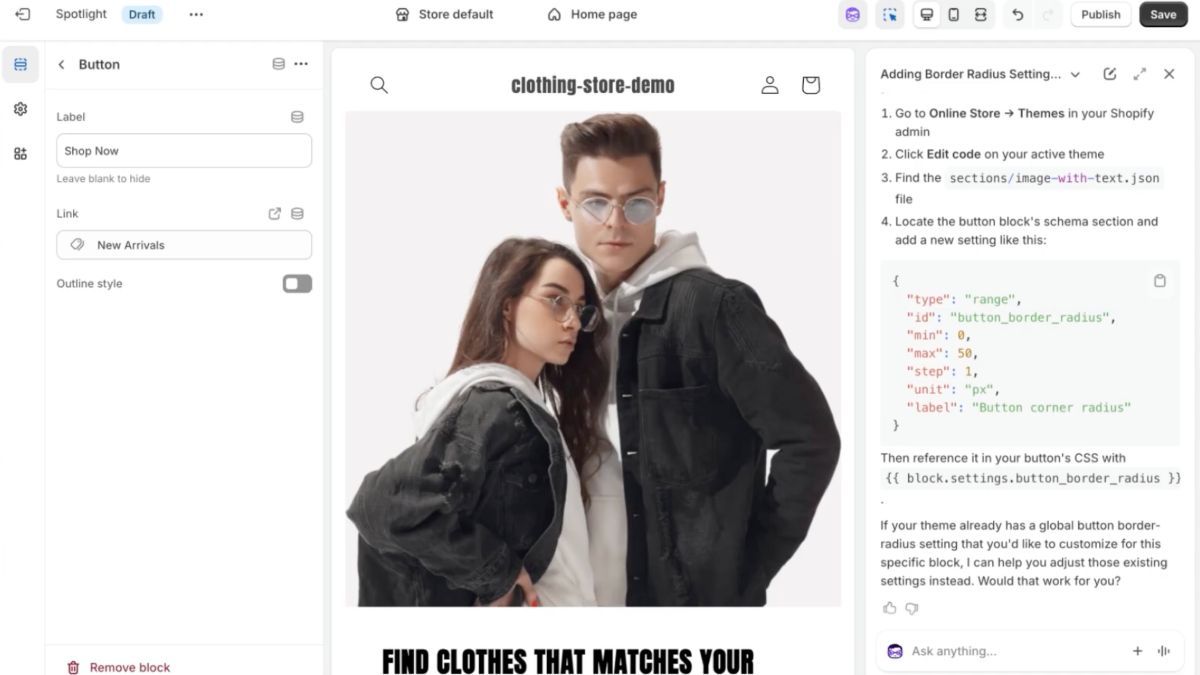
Best for: Merchants who want one AI layer across a broad range of native Shopify operations rather than a specialist agent for one workflow.
Sidekick is strongest when the task already lives inside Shopify. It starts with store context rather than waiting for the merchant to paste it into a chatbot, and can move from analysis to a supported Admin action without handing the work off to another interface.
A merchant can ask why sales fell, follow with “what should I do about it?”, turn the answer into a customer segment or discount, and keep working from the same store context.
Sidekick can also reuse saved Skills, work through longer-running tasks, call capabilities exposed by supported Shopify apps, and surface proactive recommendations through Sidekick Pulse.
Where Sidekick is particularly strong
Store analysis that leads somewhere. Sidekick can query Shopify data and generate ShopifyQL reports, but the useful part is the follow-up. A merchant can start with:
Show me the sales, costs, profits, returns, and discounts for my top 100 products.
Then continue with:
Which products are dragging margin down, and what should I look at first?
That is more useful than a dashboard summary because the analysis stays connected to the rest of the Shopify workflow.
Merchandising and collections. Sidekick can create and edit Shopify's expanded collection logic rather than simply recommend how a collection should be organized.
Since Shopify's July 2026 collections update, that can include variant-level criteria, tags, exclusions, manual selections, and other collection sources.
Create a New Arrivals collection and remove products after they've been live for two weeks.
This is a good example of where Sidekick feels less like generative AI and more like a natural-language control layer over Shopify Admin.
Orders and operational setup. Sidekick can prepare supported order changes and draft orders from plain-language instructions.
Create a draft order with two blue shirts and apply a 10% discount.
The merchant still reviews consequential changes before they apply. That approval layer is important: Sidekick is designed to shorten the path to execution, not silently take control of the store.
Reusable store workflows. Saved Skills make Sidekick more useful over time. A merchant can save a recurring inventory review, brand-voice instruction, weekly sales analysis, or another repeatable prompt and call it again instead of rebuilding the instructions every time.
That is a meaningful difference from a general chatbot. The goal is to make recurring Shopify work easier to run again next week.
Connected-app orchestration. Sidekick App Extensions let supported Shopify apps expose their own data and actions inside the conversation. That means Sidekick increasingly acts as the conversational layer while specialist apps keep doing the work they were built for.
What Sidekick is not
Sidekick's breadth is also its boundary.
It can analyze pricing and change supported Shopify data, but it isn't a continuous competitor-repricing engine. It can create and edit Shopify products, but it isn't specialized around researching an external product opportunity and turning that opportunity into a conversion-focused launch page.
And Shopify is explicit that Sidekick isn't a customer-facing support agent that independently handles shopper conversations.
A useful rule is:
If the workflow already lives primarily inside Shopify, Sidekick is usually the first AI tool to evaluate. If the workflow starts outside Shopify or requires deep specialization, a specialist agent may go further.
Biggest advantage
Sidekick combines native Shopify context, conversation state, analytics, reusable workflows, connected-app capabilities, and real Admin actions in one interface. It can move from “what happened?” to “what should I do?” to a supported action without rebuilding the context elsewhere.
Biggest limitation
Its depth varies by workflow. Sidekick covers more of Shopify than the specialist tools on this list, but Gorgias goes further in customer-facing support, PagePilot goes further in pre-catalog product research and launch, and dedicated pricing tools go further in continuous competitor-driven repricing.
2. ChatGPT + Shopify: best for running store operations from a chat window
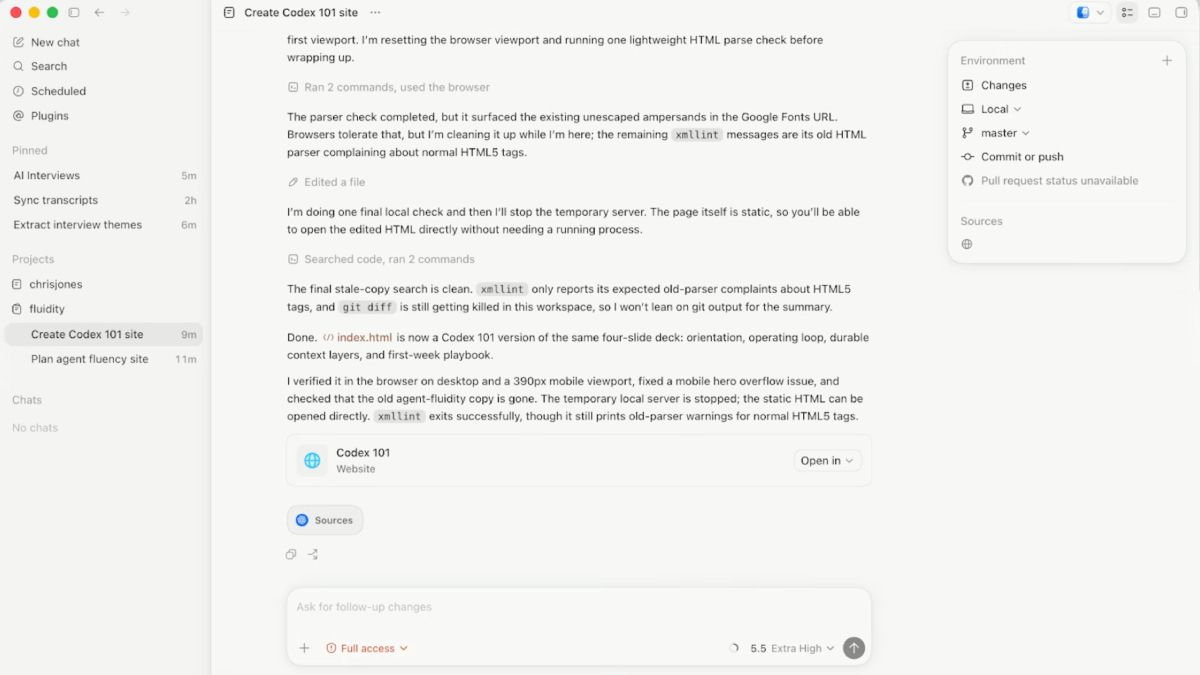
Best for: Merchants who already use ChatGPT for research, planning, copy, analysis, or day-to-day work and want supported Shopify actions available in the same conversation.
The official Shopify plugin for ChatGPT turns ChatGPT into an external interface for Shopify rather than replacing Shopify Admin. Once a store is connected, ChatGPT can retrieve live Shopify data and take supported actions without the merchant copying instructions back into the Admin manually.
That makes it useful in a slightly different way from Sidekick. Sidekick begins inside Shopify with native store context. ChatGPT begins as a general-purpose AI environment and calls Shopify when the conversation needs store data or an actual Shopify action.
Where ChatGPT + Shopify is strongest
Products and catalog changes. The plugin has dedicated write access for products and collections, including product titles, descriptions, prices, variants, SKUs, images, status, and collection membership.
@Shopify create a Travel Bottle for $39.99 with Black and Blue variants, then add it to my Summer Travel collection.
This is real catalog execution, not a product description that still needs to be pasted into Shopify.
Inventory. ChatGPT can retrieve variant inventory, check quantities by location, and update stock at supported locations.
@Shopify show me which products have fewer than 10 units left, then set this variant's inventory to 40 at the warehouse location.
That makes it useful for straightforward inventory administration, although it isn't an inventory-planning system deciding reorder quantities or supplier purchases on its own.
Discounts. The plugin can create supported percentage discounts directly from the conversation rather than merely suggesting a promotion.
Store analysis. Orders, customers, and analytics are available on the read side. A merchant can ask ChatGPT to inspect sales, recent orders, or customer history and then reason over that information in the broader conversation.
This is where the permission boundary matters: reading an order is not the same as operating on it. The plugin's dedicated order access is read-only. It can inspect an order, but refunds, cancellations, returns, and order edits still belong in Shopify Admin or another tool with those permissions.
The Admin API adds breadth, with a caveat
The Shopify connection can also work with objects such as pages, blogs, navigation menus, metafields, markets, and translations through Shopify's Admin API.
Those aren't all exposed through the same purpose-built actions as products, inventory, or discounts. The broader the request moves into general Admin API operations, the more important it becomes to inspect exactly what ChatGPT proposes before applying it.
That's an important distinction when evaluating the plugin: “Shopify access” is not one permission level. Some workflows have dedicated write actions, some are read-only, and others rely on broader Admin API access.
Where it differs from Sidekick
The reason to choose ChatGPT + Shopify isn't that it has deeper Shopify access than Sidekick. It generally doesn't.
The advantage is workflow continuity outside Shopify. A merchant might research an idea, work through positioning, analyze a spreadsheet, draft campaign copy, and then create or update the relevant Shopify product without leaving the same ChatGPT conversation.
Sidekick does the inverse: Shopify is the home environment, and AI is embedded inside it.
That makes the choice less about which chat interface looks better and more about where the merchant's work already happens.
Biggest advantage
Shopify becomes an actionable tool inside a general-purpose AI workspace. Merchants can move from reasoning or analysis to supported catalog, inventory, collection, or discount changes without manually carrying the result back into Shopify.
Biggest limitation
Its Shopify authority is uneven by object. Products, collections, inventory, and discounts have meaningful write access, while orders, customers, and analytics remain largely read-only through their dedicated tools. It also doesn't replace specialist systems for customer-support resolution, competitive repricing, or product-launch workflows.
3. PagePilot MCP + AI agent: best for product-launch operations
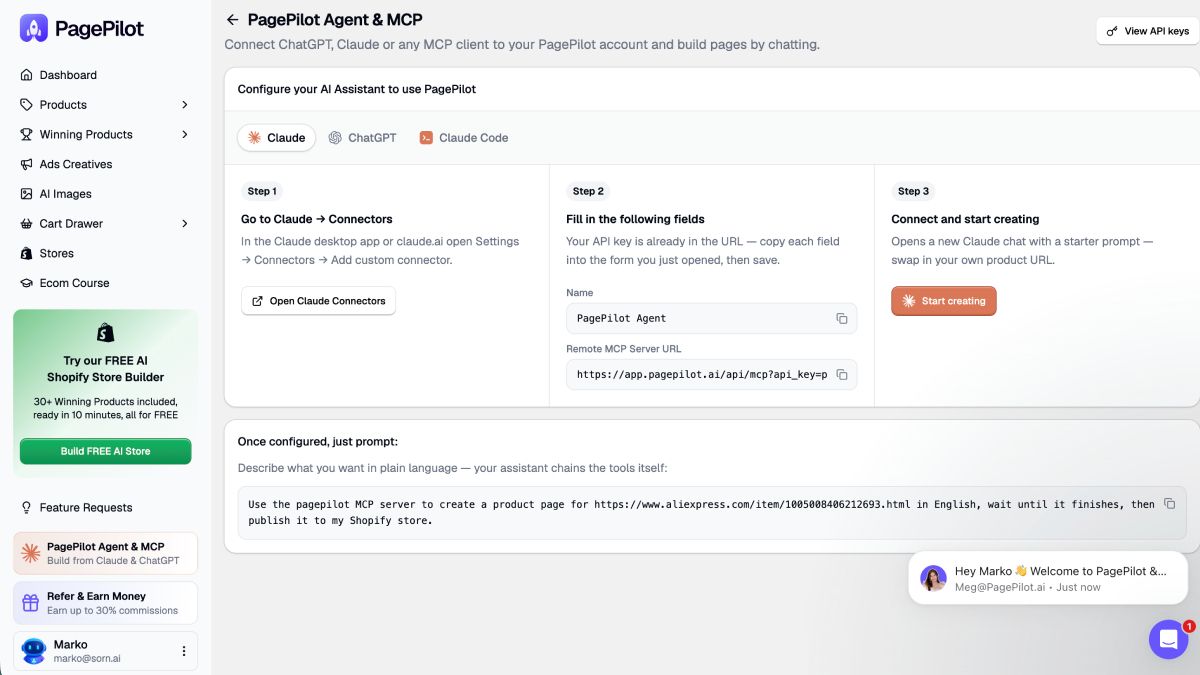
PagePilot MCP isn't itself the AI agent. It gives an MCP-compatible assistant such as ChatGPT or Claude access to PagePilot's product-research, page-building, offer-editing, creative, and publishing tools.
Best for: Shopify merchants, dropshippers, performance marketers, product testers, agencies, and teams that repeatedly move new products from research into launch.
The useful distinction is where the workflow starts. Sidekick and the Shopify plugin are strongest once Shopify already contains the product or store data they need. PagePilot can begin earlier, with the question:
What should I sell next?
From there, the same AI conversation can move into building and configuring the product for launch.
Where PagePilot MCP is strongest
Product research before the catalog exists. PagePilot's research tools can surface winning products, high-revenue Shopify stores and their bestsellers, products receiving heavy Facebook ad activity, Scaling-status products, and margin comparisons.
Using the PagePilot MCP, show me products currently scaling on Facebook and pick the highest-margin opportunity.
This is different from analyzing products already inside Shopify. The research itself can become the input for the next step.
Turning a source product into a launch page. PagePilot can build product and landing pages from an external product source, with instructions for audience, language, positioning, and template.
Create a German product page for this URL using the Bloom template, targeted at women.
The AI isn't only writing product copy. It is asking PagePilot to create the actual page structure that will later be published.
Offer and catalog setup. Once the page exists, the MCP workflow can edit copy, guarantees, reviews, product pricing, compare-at pricing, options, variants, and SKUs.
Set the price to 29.99 and compare-at to 49.99 for every variant, then make Red / Large 34.99.
That matters because the page doesn't have to leave the conversation every time the merchant moves from messaging into merchandising.
Creative changes inside the launch workflow. PagePilot MCP can inspect the images already attached to the page, check the remaining AI-image allowance, and replace selected product photos with generated lifestyle scenes.
Replace three product photos with AI lifestyle images.
This is narrower than a general-purpose image editor. The value is that the image work sits inside the same product-launch sequence as research, page creation, pricing, and publishing.
Publishing to Shopify. Once a Shopify store is already connected to PagePilot, the AI can preview the page and publish it, including publishing as a new Shopify product where appropriate.
That creates the workflow PagePilot is really built around:
research → choose → build → configure offer → edit variants → generate creative → preview → publish
For example:
Using the PagePilot MCP, find a winning product, build a French page for it, set the price to 39.99, replace three images with lifestyle creatives, and publish it to my store.
Where PagePilot MCP stops
This specialization is also important to the comparison.
PagePilot MCP does not become a general Shopify administrator after launch. It isn't the tool for inventory planning, order fulfillment, support conversations, lifecycle marketing, or broad store analytics. Deeper PagePilot design work also still belongs in the PagePilot dashboard; MCP doesn't currently replace every page-management function.
That boundary is useful rather than accidental. PagePilot goes deeper on one operational problem instead of trying to become the agent for every part of ecommerce.
Biggest advantage
PagePilot can start before the product exists in Shopify and keep product research, page creation, offer setup, creative work, and publishing inside one connected AI workflow. The handoffs that normally sit between finding a product and getting its page live become the thing being automated.
Biggest limitation
Its depth is concentrated around product research and launch. Once the product is live, broader Shopify operations are better handled by tools such as Sidekick, while support, lifecycle marketing, fulfillment, and continuous repricing remain specialist jobs for other systems.
Automate Your Product-Launch Workflow With PagePilot MCPConnect ChatGPT or Claude to PagePilot MCP and move from product research to a published Shopify page in one conversation.
4. Gorgias AI Agent: best for Shopify support and order operations
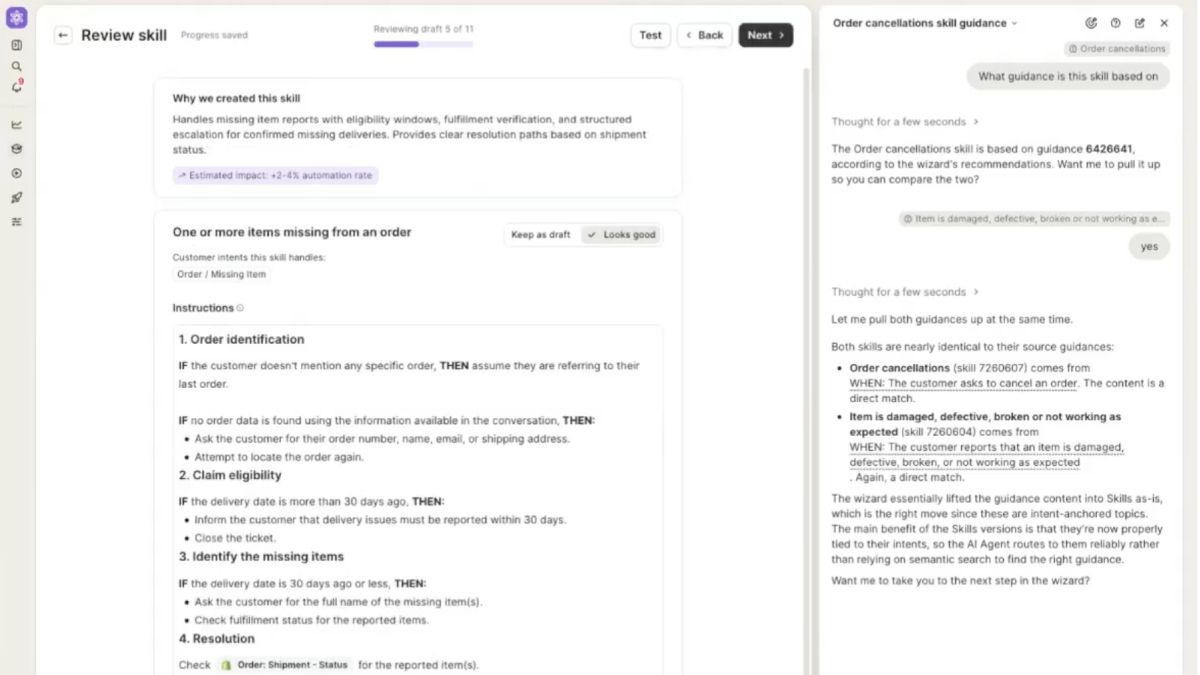
Best for: Shopify stores with enough support volume that repetitive post-purchase requests (cancellations, address changes, item swaps, reshipments, subscription changes) are consuming real agent time.
Gorgias AI Agent is strongest when a support conversation needs to end with something actually changing in the systems behind the ticket.
That is the important distinction. A normal support bot can tell a customer how to change an order. Gorgias can be given an authenticated Shopify Action that makes the supported change itself.
The automation is configured, not automatic
Connecting Shopify to Gorgias does not give AI Agent unrestricted access to the store.
Available Actions enter an Action library, and the merchant decides which ones the AI can use. Those Actions are then added to a Skill or Guidance that tells the agent when the action applies. Merchants can also add conditions such as “only cancel an order if it has not been fulfilled yet.”
That makes the permission model much more specific than “the AI has Shopify access.”
The merchant is effectively defining:
- What the agent can change
- When it is allowed to make the change
- Which conditions have to be true first
- Which connected app should execute each step
- Whether the shopper must confirm before the action runs
For irreversible actions such as cancelling an order or skipping a subscription, Gorgias turns customer confirmation on automatically. Merchants can disable it, but only after explicitly acknowledging the risk.
Where Gorgias is particularly strong
Time-sensitive order changes. Gorgias can cancel eligible unfulfilled orders, edit shipping addresses, remove order items, issue the relevant refunds, restock products, and send confirmation back to the shopper. These are exactly the requests where waiting several hours for a human agent can make the difference between fixing the order and missing the fulfillment window.
Customer: I entered the wrong shipping address.
The useful workflow isn't “here are instructions for updating your address.” AI Agent checks whether the order still meets the merchant's conditions, collects or confirms the new address, and uses the Shopify Action to update it when allowed.
Multi-step resolutions. A Gorgias Action does not have to equal one API call. Merchants can sequence several steps, and those steps can span more than one connected app.
For example, a custom workflow could check information in Shopify, update another fulfillment or subscription system, then return the result to the support conversation. Gorgias also offers an advanced Action builder with conditional branches and HTTP requests for teams that need workflows beyond the prebuilt integrations.
That is where Gorgias starts looking less like an AI helpdesk and more like a support orchestration layer.
The order-editing edge cases matter
This is also where a superficial feature list can be misleading.
A cancellation or address change may only be allowed while the order is still unfulfilled. Item replacement has its own limits, and if a replacement costs more than the original item, the workflow can require a human handoff to handle the additional payment.
A Shopify-side action also does not magically update every external system. If a 3PL, subscription platform, or another service needs to change as well, that system has to be connected into the Action workflow.
So the real question is not:
Can Gorgias cancel an order?
It's:
Under what conditions can it cancel the order, what else needs to update, and what happens when the request falls outside those conditions?
That is the level at which Gorgias should be evaluated.
More than post-purchase support
Gorgias AI Agent also works across email, chat, SMS, WhatsApp, Instagram DMs, and Facebook Messenger, using the same knowledge, Skills, Actions, and tone settings across those channels. It can also handle product questions and shopping-assistance workflows before purchase.
But its strongest operational advantage in this comparison is still what happens after a shopper asks for something to change.
Biggest advantage
Gorgias connects customer conversations directly to controlled operational Actions. Instead of answering a ticket and leaving the real work for a human, it can resolve supported requests across Shopify and other connected systems, with merchant-defined conditions and confirmation rules.
Biggest limitation
Its autonomy has to be designed. Merchants still need to expose the right Actions, define the conditions and exception paths, connect any external systems involved, and decide when a human should take over. Gorgias is powerful because it’s configurable, but not because it can freely change anything in the store.
5. Prisync AI: best for automated Shopify pricing
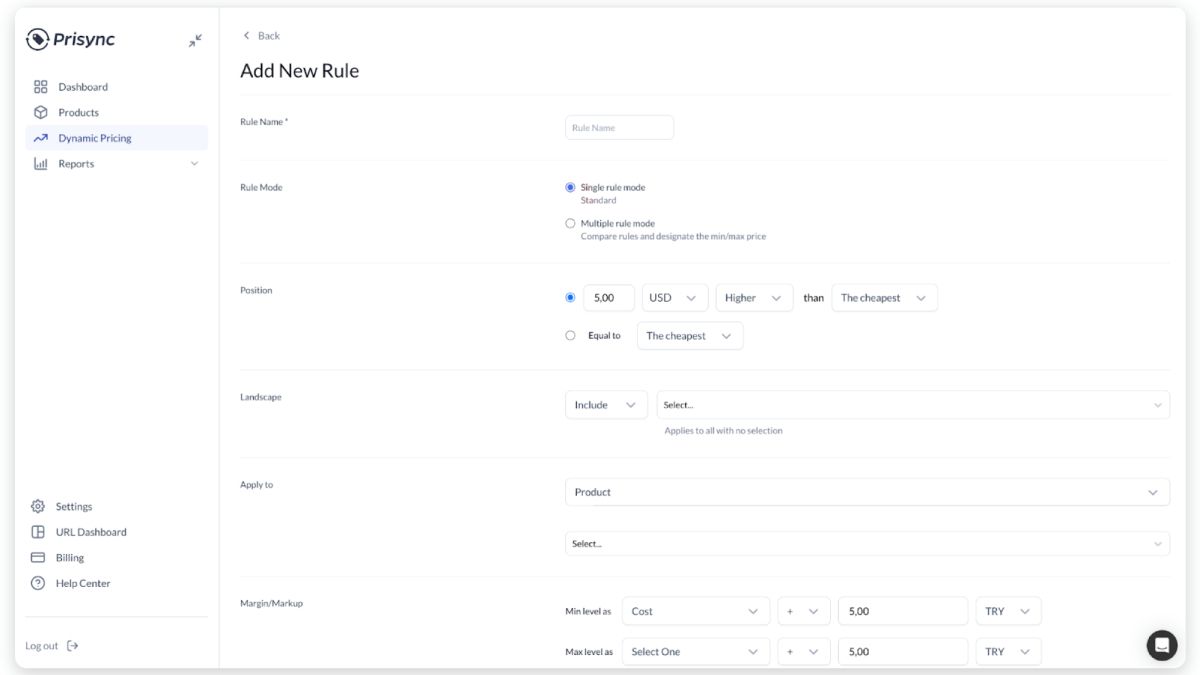
Best for: Shopify merchants with enough price competition that checking rival stores manually and adjusting prices product by product no longer makes sense.
Prisync is the outlier on this list. It is better thought of as AI-powered pricing intelligence plus rule-based repricing than as a conversational ecommerce agent. It doesn't take an open-ended instruction, reason across the store, and decide which tools to call in the way Sidekick or Gorgias can.
What it does automate is much narrower and, for the right merchant, much deeper:
Competitor monitoring → pricing calculation → Shopify price update.
The important part is how the pricing rules are built
Prisync's SmartPrice engine doesn't simply decide that a product should be cheaper.
The merchant defines the strategy first. A rule can position a price:
- Above or below the cheapest competitor;
- Equal to the cheapest competitor;
- Relative to the average or highest competitor price;
- By a fixed amount or percentage.
The merchant can then decide which competitors count, which products the rule applies to, and how far the calculated price is allowed to move.
That last part matters. Prisync can use product cost and additional costs to establish minimum and maximum margin levels, so “beat the cheapest competitor” doesn't have to turn into “keep lowering the price until the margin disappears.”
Match the cheapest competitor, but never price below my minimum profit margin.
That's much closer to what Prisync is actually automating than a vague claim that “AI finds the optimal price.”
Rules can be scoped instead of applied storewide
Pricing rules can target all products or specific:
- Products
- Collections
- Brands
- Categories
Prisync also has rule priority when more than one rule could apply. More specific product rules can take precedence over broader collection, brand, category, or storewide rules.
For more complex strategies, merchants can create multiple SmartPrice rules and tell Prisync how to choose between them, including selecting the lowest result, highest result, the result closest to the original price, or moving through rules in order until one satisfies the configured margin limits.
This is where Prisync becomes more useful than a generic “change my price” AI command. The merchant defines the pricing policy once, then the engine repeatedly evaluates new market data against it.
Competitor monitoring is configurable too
Prisync gives Shopify merchants three different ways to build the competitive data set.
- URL-based monitoring tracks exact competitor product URLs added by the merchant. Those prices are normally checked three times per day.
- Channel-based monitoring automatically matches products on supported channels such as Google Shopping and Amazon using product identifiers such as GTIN, UPC, or EAN. Those matches are refreshed daily, and new competitors can be discovered automatically.
- Hybrid monitoring combines both: automatically matched marketplace competitors plus manually selected URLs the merchant specifically wants to watch.
That matters because “competitor monitoring” isn't one workflow. A retailer with five known rivals may want precise URL tracking. A catalog with thousands of standardized products may benefit more from automatic channel matching.
What happens once Prisync finds a new price?
For Shopify merchants, Prisync can synchronize the product catalog and push calculated SmartPrice values back into Shopify through automated repricing.
The workflow is essentially:
competitor data changes → Prisync recalculates SmartPrice → pricing rules and margin limits are checked → eligible Shopify price is updated
That is real operational automation, but it is deliberately constrained by the strategy the merchant configured beforehand.
It also explains why Prisync shouldn't be confused with Sidekick.
Sidekick can answer:
Analyze my pricing and tell me where I may have an opportunity.
Prisync is built for:
Keep monitoring this competitive set and keep adjusting eligible prices according to these rules.
Those are different jobs.
The update cadence has limits
Prisync's marketing uses language such as AI-powered and automated pricing, but merchants shouldn't interpret that as every competitor price being scraped and every Shopify price changing second by second.
Update frequency depends on the monitoring setup. Prisync currently documents URL-based tracking at up to three updates per day, while channel-based matches are generally refreshed daily. Hybrid accounts inherit both cadences depending on the source.
Prisync also documents scheduled periods when automated Shopify repricing pauses and resumes afterward.
For most retailers, that can still remove a large amount of manual competitor checking. But it is more accurate to call it continuous pricing automation on a defined refresh schedule than unrestricted real-time repricing.
Where the “AI” label needs context
Prisync's current Shopify listing and website describe the platform as AI-powered, particularly around competitor discovery, monitoring, price intelligence, and automation.
But the documented repricing logic itself is highly explicit and controllable. Competitor position, costs, margins, product scope, rule priority, and fallback thresholds are all configured by the merchant.
That is actually an advantage for pricing.
A system changing hundreds of prices shouldn't behave like an opaque chatbot improvising from one prompt. Prisync gives the merchant a pricing strategy and lets automation repeatedly execute against it.
Biggest advantage
Prisync turns competitive pricing into an ongoing system rather than a recurring manual task. It monitors competitors, calculates SmartPrice recommendations against merchant-defined rules and margin limits, and can push eligible price changes back to Shopify automatically.
Biggest limitation
Its intelligence is intentionally narrow. Prisync doesn't reason across orders, merchandising, customer service, landing pages, or broader store operations, and its repricing logic still requires the merchant to define a sensible strategy, competitive set, costs, and guardrails before automation becomes useful.
6. Klaviyo AI agents: best for lifecycle and customer operations
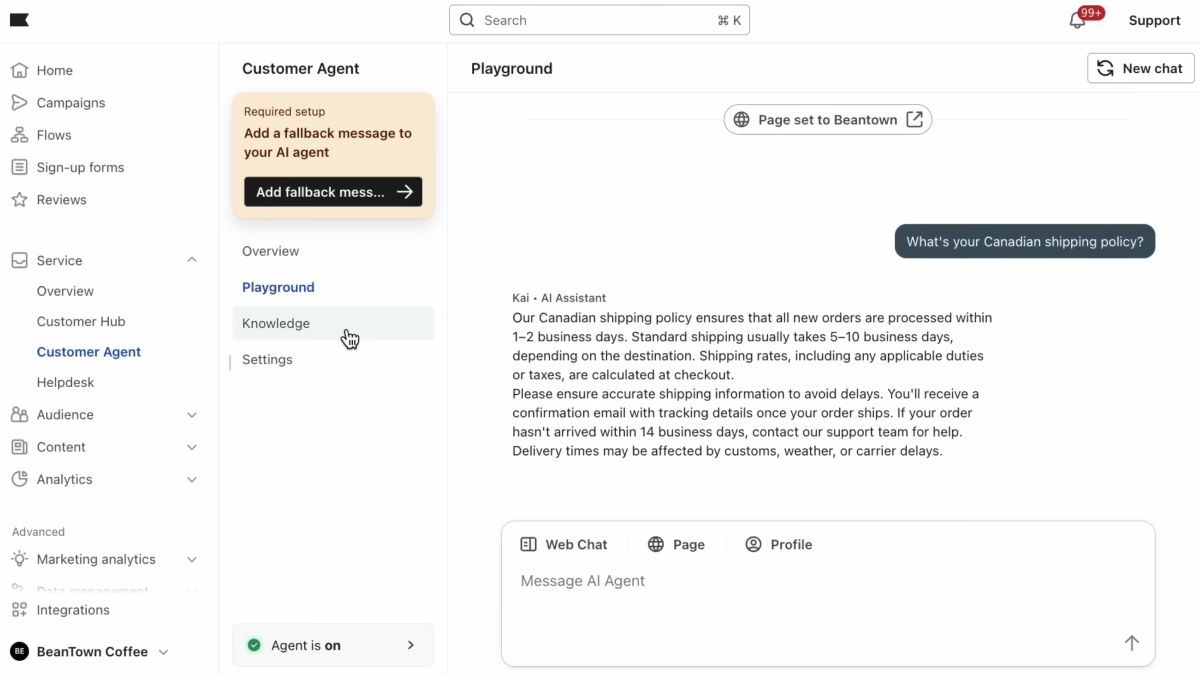
Best for: Shopify brands that want AI working across marketing and customer service using the same customer, behavioral, and commerce data.
Klaviyo is unusual in this list because it doesn't try to make one agent do everything. It splits the work between Composer, its marketing agent, and Customer Agent, its shopper-facing service agent.
Both sit inside the same Klaviyo customer-data environment, but they operate at different levels of autonomy.
The distinction is that Composer helps the marketing team decide and build what should happen next. Customer Agent deals directly with shoppers and can resolve supported requests when the right commerce tools are connected.
Composer: marketing analysis that can turn into campaign work
Composer moved into public beta on June 30, 2026. A marketer can give it a brief such as:
Build a spring reactivation campaign for customers who haven't purchased in 90 days across email and SMS.
Composer can use the brand, customer, performance, and account data already in Klaviyo to build the audience logic, campaign structure, channel-specific content, and timing around that request. The marketer still reviews and approves the work before it launches.
So Composer is more than an AI copywriter, but it isn't a hands-off campaign sender either.
Its newer capabilities make that distinction more interesting. As of September 2026, Composer can use SQL-backed analysis, schedule recurring tasks, save reusable Skills, and edit segments directly. Klaviyo also says Composer's analytical answers can include citations a marketer can inspect.
That means a workflow can move beyond:
Write an email.
toward:
Analyze what changed, identify the audience that needs attention, build the campaign, and prepare it for review.
Reusable Skills and scheduled tasks also make Composer useful for work that repeats, such as monthly performance reviews or recurring campaign checks, instead of forcing the marketer to rebuild the same instructions each time.
Customer Agent: service that can actually resolve the request
Customer Agent works on the other side of the lifecycle. It operates across web chat, email, SMS, and WhatsApp using the same configured knowledge and Guidance. It can answer product questions, recommend products, track orders, support returns and exchanges, manage subscriptions, edit supported orders, and hand the conversation to a person when the request falls outside its boundaries.
The useful nuance is that these capabilities are built from Skills and Tools, not one blanket permission to change anything.
For example:
- A Shopify connection unlocks product recommendations and order tracking.
- Order editing requires Shopify order-edit permissions.
- Returns and exchanges require an integration such as Loop or AfterShip.
- Subscription editing requires Recharge or Skio.
- Loyalty workflows require a provider such as Yotpo or Smile.io.
So saying “Klaviyo can handle returns” without that context is too broad. Customer Agent can handle the workflow when the required Skill, permissions, and integration are available.
That also makes its operational model different from Gorgias. Both can resolve support requests, but Klaviyo's broader proposition is tying those service interactions back to the same customer profile used for segmentation, personalization, and marketing.
One customer context across marketing and service
This is the strongest reason Klaviyo belongs in a store-operations comparison at all.
A support conversation isn't isolated from the marketing record. Composer and Customer Agent work from the same broader Klaviyo customer context, including behavioral signals, purchase history, profiles, and other CRM data. Klaviyo explicitly positions the two agents as sharing intelligence across marketing and service.
That creates a different operating model from Sidekick.
Sidekick is centered on the store. Klaviyo is centered on the customer relationship.
The questions it is better positioned to answer are things like:
- Who should we re-engage?
- What should we send them?
- What does this shopper need right now?
- Can the agent resolve that request without handing it to a person?
Where the autonomy differs
It would be misleading to describe both Klaviyo agents as equally autonomous.
Composer: analyzes, recommends, builds, and prepares marketing work, with a marketer retaining control over launch.
Customer Agent: interacts directly with shoppers and can execute supported service workflows where its Skills, permissions, and integrations allow it.
That is a useful split rather than an inconsistency. A campaign going to thousands of customers has a different risk profile from resolving one shopper's order question.
Biggest advantage
Klaviyo connects marketing and customer service to the same underlying customer context. Composer can turn performance and audience data into marketing work, while Customer Agent can use customer and commerce data to resolve shopper requests across multiple channels.
Biggest limitation
Klaviyo's operational depth is concentrated around the customer lifecycle rather than broad Shopify administration. Composer still keeps the marketer in the approval loop, and Customer Agent's ability to edit orders, process returns, manage subscriptions, or handle loyalty depends on the Shopify permissions and third-party integrations connected to it.
How these Shopify AI tools actually operate
Best AI for Shopify pricing automation
The best Shopify pricing AI depends on whether the job is analysis, launch pricing, or continuous repricing.
- For pricing strategy and analysis. Shopify Sidekick, which Shopify explicitly promotes for analyzing pricing strategy and surfacing opportunities.
- For setting launch prices and variant pricing. PagePilot MCP + AI agent, best once price changes are part of launching or configuring a product page.
- For competitor-driven automatic repricing. A dedicated pricing tool such as Prisync AI, which Shopify's App Store categorizes under auto-repricing.
This split matters because it keeps PagePilot's pricing claim honest, launch-price editing, not ongoing pricing automation.
Best AI for Shopify product and catalog management
Shopify Sidekick leads broad native catalog work. The official ChatGPT plugin covers similar ground from a chat window, creating products with variants and pricing, updating descriptions and SKUs, and organizing collections.
PagePilot MCP fits in when the catalog task is really part of a launch, the product, offer, and variants get built inside PagePilot's research-to-publish workflow rather than as a standalone Admin edit.
Best AI for Shopify product pages and landing pages
For conversion-focused product landing pages built from external product URLs, PagePilot MCP is the most specialized option here.
Sidekick can modify Shopify products, themes, and content. The ChatGPT plugin can create and edit Shopify pages and product data.
PagePilot's workflow specifically supports product URLs, templates, audience targeting, marketing angles, translation, copy revisions, pricing, variants, AI imagery, and Shopify publishing, in one chain.
Using the PagePilot MCP, create a product page for [URL] in German using the Bloom template, target women, set the price to 39.99, and give me the preview.
That's an operational page-building workflow, not just generative copy.
Best AI for Shopify customer support operations
Gorgias AI Agent resolves supported customer requests with actual Shopify changes, order cancellations, shipping-address updates, item removal or replacement, and free reshipments, with merchant-defined conditions and customer confirmation before anything sensitive executes.
The edge cases matter here too, single-item replacements, order-state dependencies, and payment handoffs on price differences, covered in the Gorgias section above.
PagePilot operates before the purchase. Gorgias operates after it.
What Shopify operations still vary most by agent?
Inventory and orders are the two areas where "it depends on the tool" matters most.
Inventory. Sidekick can analyze inventory and flag low-stock and reorder needs. The ChatGPT plugin can retrieve variant inventory, check stock across locations, and set stock quantities at a location. PagePilot doesn't belong here except as a contrast, its workflow never touches inventory.
Orders. Sidekick can help with supported order and draft-order operations. The ChatGPT plugin can read order information but its dedicated order tools don't refund, cancel, or edit directly. Gorgias goes furthest, cancellations, address changes, item changes, reshipments, as part of its support workflows. PagePilot, again, isn't built for this.
That honesty is exactly what makes the PagePilot recommendation elsewhere hold up.
AI agents vs Shopify Flow
Shopify Flow executes predefined trigger-condition-action workflows. AI can help build those workflows, Sidekick can generate a Flow workflow from a plain-language description, and Flow can call an AI model for generated text inside a step.
But once a Flow workflow is switched on, it follows the logic that was configured.
An agent works differently at runtime. It interprets a goal, "look at inventory, sales velocity, margin, and upcoming promotions, and tell me which products are most likely to stock out," and chooses among supported actions based on the store's current context, rather than a fixed trigger someone wrote in advance.
Rules-based automation still earns its place. Some operational tasks are more predictable, and safer, as a deterministic workflow than as something an AI interprets fresh every time.
How to automate Shopify store management with AI
Break store management into workflows. Don't go looking for a mythical "AI that runs Shopify." Map out products, pages, pricing, inventory, orders, support, and marketing separately.
Decide which tasks need AI reasoning. Use AI where interpretation and context matter.
Keep predictable workflows deterministic. Use rules or Shopify Flow where that's a better fit.
Choose specialist agents. Sidekick for Shopify ops, PagePilot for launch ops, Gorgias for support ops, a dedicated tool like Prisync for pricing ops.
Define permission boundaries. Decide, per system, whether it can read, suggest, draft, edit, publish, refund, or cancel.
Keep humans in the loop for high-impact actions. Bulk price changes, refunds, cancellations, product deletion, major inventory changes, storewide publishing. Shopify itself recommends reviewing AI-generated changes before applying them.
What should you look for in a Shopify store-management AI agent?
Are Shopify store-management AI agents worth it?
They're worth it when they cut out a repetitive operational handoff, not when they just generate more content for someone to copy and paste. The useful measurement is workflow-specific, not one generic formula.
- Product launch. Time from product candidate to published page.
- Support. Automated resolution rate, handoff rate, failed-action rate.
- Pricing. Percentage of catalog automatically repriced, margin-floor violations, manual overrides.
- Sidekick. Admin time saved, report and configuration completion rate, correction rate.